

Building Conversational Audio Agents with LangGraph and Real-Time Validation
Let an agent validate another agent in a real-time conversational workflow

Your AI agents don’t remember. You ask about LangGraph, get an answer, close the terminal, and poof—the conversation’s gone. Next time you ask a follow-up, the agent has no idea what you’re talking about.
What if your AI could remember entire conversations, validate its own research quality, and speak its responses naturally, all while scaling from zero to handling real user traffic? That’s not a future feature. That’s what I built.
I wanted to build a system where a researcher agent could search the web and synthesize findings, while a validator agent assessed quality and tracked improvements over time. I wanted to make it conversational, so that each agent talks to each other. Both agents needed distinct voices for audio playback, and every conversation had to persist across sessions. The architecture had to support both CLI and web interfaces without code duplication.
To make the application more solid, I used LangGraph’s checkpoint system for state persistence, structured outputs for reliable parsing, and a clean interface pattern that let me swap TTS providers (ElevenLabs, Groq, Google Cloud) with a single environment variable.
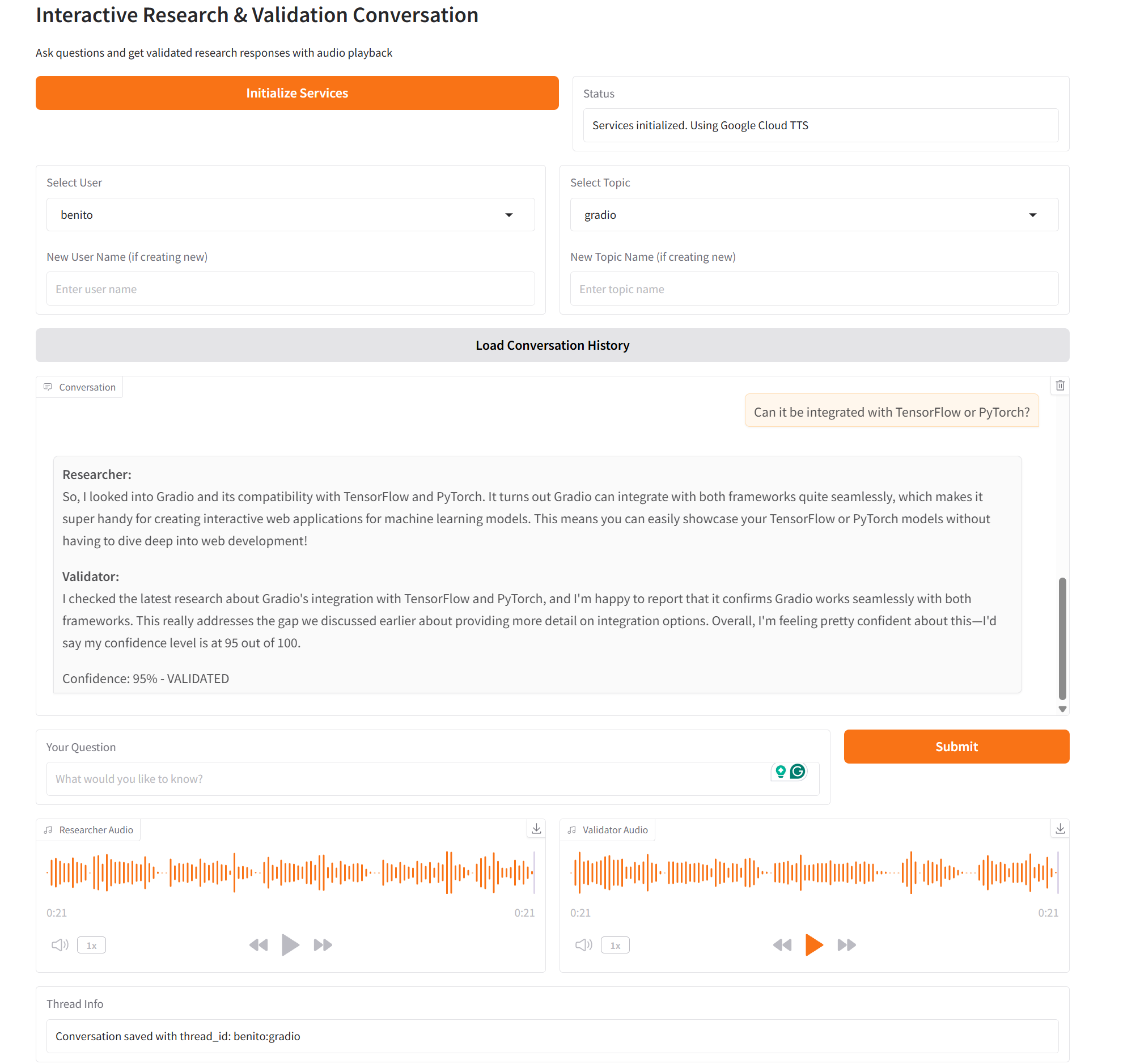
The result? Ask “What is LangGraph?” and get validated research with audio. Close everything. Come back three days later, ask “How does that compare to LangChain?” and the system picks up exactly where you left off, complete with conversation history and previous validation scores.
You can check the code in the repository:
The Problem: State Management
Building a single-agent conversational system is straightforward enough. User sends message, LLM responds, done. But multi-agent systems? That’s where things get interesting.
I needed:
Agent coordination: Researcher runs first, validator runs second, in sequence
State persistence: Conversations must survive server restarts and resume seamlessly
Context management: Long conversations need summarization to avoid token limit explosions
Audio generation: Both agents need distinct voices and conversational tone
Audio coordination: Both agents must talk to each other without overlapping or too much waiting time.
Validation tracking: The validator should recognize when research improves and adjust confidence scores accordingly
LangGraph’s checkpoint system excels in this task as it offers several options to save existing conversations and retrieve them when required. For this project, I used the AsyncSqliteSaver to save the conversations in a SQLite database based on user and topic, so that several users can have their own conversations saved separately.
The Architecture: Clean Separation with LangGraph
Here’s how the system is structured. The workflow uses LangGraph’s StateGraph with three core components: researcher agent, validator agent, and checkpoint persistence.
The conversation state is a Pydantic model that holds everything needed for the workflow: message history, the current query, research and validation results, audio data, and a flexible metadata dictionary that becomes crucial for tracking validation history over time. This single state object flows through both agents, getting updated at each step.
The graph connects these pieces with a simple sequential flow:
workflow = StateGraph(ConversationState)
workflow.add_node(”researcher”, researcher_node)
workflow.add_node(”validator”, validator_node)
workflow.set_entry_point(”researcher”)
workflow.add_edge(”researcher”, “validator”)
workflow.add_edge(”validator”, END)
Simple, sequential flow. Researcher → Validator → Done. No branching logic, no complex routing. Just clean, predictable execution.
The magic happens in checkpoint persistence. Using SQLite, every conversation gets a unique thread_id (format: user:topic) that lets you resume exactly where you left off:
thread_id = normalize_thread_id(selected_user, selected_topic)
config = {”configurable”: {”thread_id”: “benito:langgraph-basics”}}
This design keeps agents focused on their jobs while LangGraph handles state orchestration.
The Researcher Agent: Search + Synthesis + Audio
The researcher’s job is straightforward: take a question, search for information, synthesize findings, and generate conversational audio. But there’s nuance in how it handles conversation context.
Here’s the interesting part. The researcher doesn’t just dump search results. It uses structured output with a Pydantic model that defines three fields: a clear answer string, a list of key facts, and a list of sources. This ensures the LLM returns parseable data instead of freeform text that might break parsing. OpenAI’s responses.parse() API guarantees this structure by enforcing the schema at the API level, not through prompt engineering.
The audio generation is where things get interesting. I don’t convert the detailed research findings directly to speech—that would sound robotic. Instead, the researcher generates a separate conversational summary. Two separate LLM calls: one for detailed text synthesis, another for audio-optimized text. The audio summary uses a different system prompt that instructs the LLM to speak naturally:
You are a research assistant having a conversation with colleagues.

Your job is to verbally present your research findings in a natural, conversational way.

Speak as if you’re talking to someone, not reading a report.

Keep it concise (2-3 sentences) but informative.

Use natural speech patterns like “I found that...”, “It turns out...”, “Interestingly...”

If this is part of an ongoing conversation, reference previous points naturally when relevant.
This produces audio that sounds like a human colleague explaining findings, not a robot reading documentation.
The Validator Agent: Quality Assessment with Memory
The validator’s job is more complex than it looks. It needs to:
Assess research accuracy and completeness
Assign a confidence score (0-100)
Remember previous validation results
Recognize when research improves and adjust scores upward
The last point is critical. If the validator gives a 70% confidence score and identifies missing information, then the user asks a follow-up that addresses those gaps, the validator should recognize the improvement and raise the score.
This required careful prompt engineering. The prompt includes the full previous validation history with scores and assessments, then explicitly instructs the LLM: “If gaps are now covered, you MUST increase the confidence score.” Without this explicit instruction, the LLM tends to give similar scores regardless of improvement. The validator uses structured output with a simple two-field model:
class ValidationResult(BaseModel):
    confidence_score: int = Field(..., ge=0, le=100)
    assessment: str = Field(..., description=”Detailed assessment”)
The validation history gets stored in the conversation metadata dictionary. I keep only the last two validation results to avoid bloating the context. This creates a learning loop where the system improves over time as it addresses gaps. Each validation includes the confidence score, the detailed assessment text, and whether the research was validated (score above 70%). This history flows through the conversation state automatically.
Text-to-Speech: Three Providers, One Interface
I needed flexibility in TTS providers. ElevenLabs for quality, Groq for speed, Google Cloud for cost. Rather than hardcoding provider logic everywhere, I built a simple interface:
class AudioService(ABC):
    @abstractmethod
    async def synthesize(self, text: str) -> bytes:
        pass
Each provider implements this interface differently, but the calling code doesn’t care. ElevenLabs returns an audio generator that yields chunks, which I collect into a BytesIO buffer before returning bytes. Groq and Google Cloud have simpler APIs that return audio directly. The key is that all three conform to the same interface signature: take a text string, return audio bytes.
The default TTS_PROVIDER in the repository Google, as it is the one that offers the highest amount of free credits, which, for testing, is very practical.
Checkpoint Persistence: The Killer Feature
LangGraph’s checkpoint system is what makes this whole thing work. Every state update gets saved to SQLite:
async with AsyncSqliteSaver.from_conn_string(”checkpoints.db”) as checkpointer:
    graph = workflow.compile(checkpointer=checkpointer)
Thread IDs follow a simple format: user:topic. This creates natural conversation boundaries:
def normalize_thread_id(user: str, topic: str) -> str:
    normalized_user = re.sub(r”[^a-z0-9_-]”, “”, user.lower().replace(” “, “-”))
    normalized_topic = re.sub(r”[^a-z0-9_-]”, “”, topic.lower().replace(” “, “-”))
    return f”{normalized_user}:{normalized_topic}”
Loading previous conversations is trivial:
previous_state = await graph.aget_state(config)
if previous_state.values and previous_state.values.get(”messages”):
    existing_messages = previous_state.values[”messages”]
    existing_metadata = previous_state.values.get(”metadata”, {})
This means you can:
Close the terminal mid-conversation
Restart the server
Come back hours later
Resume exactly where you left off
The conversation history includes all messages, research findings, validation results, and metadata. No data loss, no manual state management.
Context Management: When Conversations Get Long
Long conversations hit token limits fast. After 5-6 exchanges, you’re pushing 10,000+ tokens just in conversation history. I needed automatic summarization.
The solution tracks exchanges and token count, then triggers summarization when thresholds are hit. An exchange is one user question plus both agent responses—three messages total. When you cross five exchanges or 10,000 tokens, whichever comes first, summarization kicks in.
The implementation keeps the last five exchanges as-is and summarizes everything before that into a single system message. This system message gets prepended to the conversation, giving the LLM context about earlier topics without including every word. The summarization prompt is deliberately focused. It extracts topics discussed and key findings, not detailed assessments.
You are a conversation summarizer. Your job is to create a concise
summary of the conversation, focusing on:

- Main topics and questions discussed
- Key findings and research results
- General themes and direction of the conversation

Keep the summary brief (200-300 tokens). Focus on high-level topics and findings, not specific validation scores or detailed assessments. This summary will be used to provide context for future exchanges.
This approach keeps context manageable without losing critical information. The LLM still knows what was discussed earlier, but you’re not paying for thousands of tokens of historical messages on every request.
The Gradio Interface: Audio Autoplay Done Right
Building a web interface added one tricky challenge: audio playback. I wanted sequential audio—play the researcher’s response first, then automatically play the validator’s response after.
Gradio’s audio component has autoplay, but it doesn’t handle sequential playback well. My solution uses audio duration detection with the tinytag library to parse MP3 headers and extract the duration in seconds. Then the streaming response yields intermediate results, first with only the researcher audio and a status message saying “Validating...”, then waits for the audio duration using asyncio.sleep(), and finally yields the complete result with both audio files.
Gradio’s autoplay handles the rest. Because the researcher's audio gets set first while the validator's audio is None, it plays immediately. After the sleep duration, the validator audio becomes available and autoplays second. Clean, predictable, no overlap. This pattern works because Gradio’s streaming responses let you update UI components progressively as data becomes available.
Running It Yourself
The setup is straightforward. Clone the repo, install dependencies with uv, configure environment variables, and run:
# Install dependencies
uv sync --all-groups

# Configure environment
cp .env.example .env
# Edit .env with your API keys

# Run CLI interface
make voice-conversation

# Or run Gradio web interface
make gradio-app
The CLI gives you an interactive conversation flow. Select or create a user and topic, ask questions, and get validated research with audio playback. The Gradio interface adds a web UI with dropdowns for user/topic selection and automatic audio playback.
Both interfaces use the same underlying graph and checkpoint system. Your conversations persist regardless of which interface you use.
Future Implementations
The current system handles single-turn validation well. Multi-turn validation, where the researcher can revise its findings based on validator feedback, would be more powerful. This would require adding a conditional edge from the validator back to the researcher—if the confidence score is below a threshold (say, 70%), route back to the researcher with instructions about what’s missing. The researcher could then do targeted follow-up searches and improve the response. This feedback loop would continue until validation passes or a maximum iteration count is hit.
Better web search with parallel queries would improve research quality. Tavily works well, but only searches sequentially. Running 3-4 queries in parallel with slightly different phrasings and synthesizing all results would cover more ground. The async architecture already supports this. Just fire off multiple search tasks with asyncio.gather() and combine the results.
The conversation summarization is basic. It works for keeping context under control, but a more sophisticated summarization that preserves key validation insights would help.
Adding support for document uploads, such as PDFs or text files, would let users ask questions about their own documents while still getting web research for context. Combining retrieval-augmented generation with web search would be powerful.
Conclusion
Building multi-agent systems doesn’t have to be painful. LangGraph’s checkpoint system handles state persistence elegantly, structured outputs guarantee parseable responses, and clean interfaces make swapping implementations trivial.
The key insight: keep agents focused on their specific jobs and let LangGraph orchestrate the flow. The researcher researches. The validator validates. The graph manages state. No single component does too much.
If you’re building conversational AI systems with multiple agents, start with LangGraph. The checkpoint persistence alone is worth it. Add structured outputs for guaranteed parsing, clean interfaces for flexibility, and focus agents on single responsibilities. The result is a system that’s maintainable, testable, and actually works.
The complete code is in the GitHub repository. Clone it, experiment with different providers and prompts, and let me know what you build.
See you in the next one,
Benito
I don’t write just for myself—every post is meant to give you tools, ideas, and insights you can use right away.
🤝 Got feedback or topics you’d like me to cover? I’d love to hear from you. Your input shapes what comes next!
Brilliant; your solution for persistent state management in conversational AI, using LangGraph's checkpoint system, is exactly the step needed for truely intelligent agents.
Will try today definetly let u know my learning as well by EOD.