

Building Production-Ready Desktop LLM Apps: Tauri, FastAPI, and PyInstaller
A practical guide to bundling local AI applications that users can actually install

I wanted a desktop LLM chat app. Not another browser tab competing for attention, not a cloud service sending my data somewhere else—a real desktop application that felt native, ran locally, and didn’t make users install Python.
That last requirement was the tricky part. Most Python-based AI apps assume users will install Python, create virtual environments, and manage dependencies. For developers, that’s Tuesday. For everyone else, that’s friction they won’t tolerate.
Here’s what I built: a Tauri desktop app with a Python FastAPI backend running llama.cpp for local inference, all bundled into a single installer. Users double-click, install like any other app, and start chatting with a local LLM. No Python required on their end. No dependency hell. Just a working application.
The architecture combines three layers: Tauri for the native frontend, FastAPI for the backend API, and llama.cpp for LLM inference. PyInstaller packages the entire Python stack—interpreter, dependencies, and llama.cpp DLLs—into a single executable. Tauri then bundles that executable as a “sidecar” process alongside the Rust frontend, creating native installers for Windows, macOS, and Linux.
Let’s dig into it!
The Stack and Why It Works
Tauri felt like the obvious choice for desktop app development. It’s lighter than Electron (no Chromium bloat), uses the system’s native webview, and produces installers under 10MB before adding your application logic. The Rust core handles system integration, while allowing you to build the UI using standard web technologies.
FastAPI handles the backend because I needed asynchronous support for streaming LLM responses. The streaming part matters—users expect ChatGPT-style progressive text generation, not waiting for the full response before seeing anything.
llama.cpp was non-negotiable. It’s the fastest CPU inference engine for LLMs, supports GPU acceleration when available, and works without requiring CUDA or other complex dependencies. For a 1.2B parameter model like Liquid AI’s LFM2, CPU inference is perfectly acceptable on modern hardware.
The critical piece most tutorials skip: PyInstaller with a custom spec file. Without this, you’re manually hunting down DLLs and Python dependencies, hoping you didn’t miss anything. The spec file automates this entire process.
With the stack decisions made, let’s start with the foundation: the Python backend that powers everything.
Setting Up the Backend Foundation
The FastAPI backend lives in the backend/ directory with a straightforward structure. The main.py file handles three core responsibilities: checking model status, downloading models from HuggingFace, and streaming chat responses.
Here’s what makes the backend interesting. The model download happens via HuggingFace Hub’s API, storing files in ~/.tauri-llm-app/models/. This keeps model files separate from the application code, so users can delete and re-download without touching the installation.
The chat endpoint uses Server-Sent Events (SSE) for streaming. Each token generated by llama.cpp gets sent immediately as a JSON chunk. The frontend receives these chunks and updates the UI in real-time. When generation completes, a final chunk signals completion.
One mistake I made early: UTF-8 encoding on Windows. Python’s default console encoding causes crashes when llama.cpp outputs progress indicators with emojis or special characters. The fix goes in server.py before importing anything:
import sys
import os

os.environ["PYTHONIOENCODING"] = "utf-8"
os.environ["PYTHONUTF8"] = "1"

if sys.stdout.encoding != 'utf-8':
    sys.stdout.reconfigure(encoding='utf-8', errors='replace')
This sets UTF-8 mode globally before any library tries to write to stdout. Without this, the bundled executable crashes on Windows whenever llama.cpp reports progress.
The conversation history management happens entirely in the frontend. The backend stays stateless, receiving the full conversation context with each request.
Now comes the part where most Python desktop apps fall apart: packaging everything so it actually runs on user machines.
The PyInstaller Challenge: Getting It Right
Standard PyInstaller commands won’t work. Run pyinstaller --onefile server.py and you’ll get an executable that crashes immediately when loading the LLM. The llama.cpp Python bindings expect specific DLLs that PyInstaller doesn’t know to include.
The solution is a custom PyInstaller spec file: backend/fastapi-server.spec. This file tells PyInstaller exactly what to bundle:
from PyInstaller.utils.hooks import collect_data_files, collect_dynamic_libs

# Collect llama.cpp DLL files
llama_cpp_libs = collect_dynamic_libs('llama_cpp')
llama_cpp_datas = collect_data_files('llama_cpp')

a = Analysis(
    ['server.py'],
    pathex=[],
    binaries=llama_cpp_libs,
    datas=llama_cpp_datas,
    hiddenimports=['llama_cpp', 'llama_cpp._ctypes_extensions'],
    hookspath=[],
    hooksconfig={},
    runtime_hooks=[],
    excludes=[],
    noarchive=False,
    optimize=0,
)
Three critical lines make this work:
collect_dynamic_libs('llama_cpp') finds all DLLs that llama.cpp needs and adds them to the binary bundle. On Windows, this includes llama.dll and any CUDA libraries if GPU support is enabled.
collect_data_files('llama_cpp') includes data files like model configs or tokenizer files that llama.cpp expects to find relative to the library location.
hiddenimports explicitly tells PyInstaller to include modules that are imported dynamically at runtime. The ctypes extensions are crucial—without them, llama.cpp can’t load its compiled binaries.
Building the backend executable is straightforward once the spec file is correct:
cd backend
uv run pyinstaller fastapi-server.spec
This produces dist/fastapi-server.exe (on Windows) that’s roughly 35-40MB. That size tells you everything bundled correctly—smaller means missing DLLs, larger suggests unnecessary dependencies got included.
Before moving to Tauri integration, test the executable standalone. Run it directly and verify it starts FastAPI on port 8000. If this works, the Tauri integration will work.
With a working backend executable in hand, the frontend needs to handle the conversation flow and streaming responses.
If you’re enjoying this content, consider joining the AI Echoes community. Your support helps this newsletter expand and reach a wider audience.
Frontend: Streaming UI That Feels Natural
The frontend handles three responsibilities: managing conversation state, parsing SSE streams, and rendering markdown responses. The core logic lives in src/main.ts.
Conversation state is an array of message objects. Each user query and assistant response gets appended. When sending a new message, this entire history goes to the backend, giving the LLM full context.
SSE parsing is trickier than it looks. The browser’s fetch API with ReadableStream works, but SSE messages don’t always arrive in complete chunks. A buffer handles this:
let buffer = "";

const messages = buffer.split("\n\n");
buffer = messages.pop() || ""; // Keep incomplete message

for (const message of messages) {
    // Process complete messages
}
This accumulates partial messages until finding the double-newline separator that marks message completion.
The streaming cursor creates the “actively typing” feel. As tokens arrive, they’re appended to the message bubble with a blinking cursor: <span class="streaming-cursor">▋</span>. When generation completes, the cursor disappears.
Markdown rendering uses the marked library, which handles code blocks, lists, and formatting automatically. The trick is applying Tailwind classes to the generated HTML so it matches your design system:
return html
    .replace(/<h2>/g, '<h2 class="text-xl font-bold mt-4 mb-2">')
    .replace(/<code>/g, '<code class="bg-gray-100 px-1.5 py-0.5 rounded text-sm">')
This ensures markdown output looks intentional, not like default browser styling.
One detail that matters: auto-scrolling. As tokens stream in, the message grows taller, but you want the viewport to follow the new content. Using requestAnimationFrame ensures scrolling happens after the DOM updates:
requestAnimationFrame(() => {
    messagesDiv.scrollTop = messagesDiv.scrollHeight;
});
Without this, scrolling happens before the height change, leaving new content off-screen.
The frontend and backend are ready. Now it’s time to connect them through Tauri’s sidecar pattern.
Tauri Integration: The Sidecar Pattern
Tauri’s sidecar pattern lets you bundle external executables that run alongside your app. The configuration in src-tauri/tauri.conf.json specifies the sidecar:
{
  "bundle": {
    "externalBin": [
      "binaries/fastapi-server-x86_64-pc-windows-msvc"
    ]
  }
}
That naming convention matters. The format is <name>-<target-triple>, where the target triple describes the platform. Get your target triple by running:
rustc -Vv | grep hostOn Windows, this typically returns x86_64-pc-windows-msvc. So your executable becomes fastapi-server-x86_64-pc-windows-msvc.exe.
The Rust code in src-tauri/src/lib.rs spawns the sidecar during app startup:
.setup(|app| {
    let sidecar_command = app.shell().sidecar("fastapi-server")?
        .env("PYTHONUTF8", "1")
        .env("PYTHONIOENCODING", "utf-8");
    let (_rx, _child) = sidecar_command.spawn()?;
    Ok(())
})
The environment variables ensure UTF-8 encoding works correctly in the bundled Python environment. Without these, you’ll hit the same encoding issues we fixed earlier, but now they’re harder to debug because stderr isn’t visible.
The sidecar process runs independently. Tauri manages its lifecycle—start it on app launch, kill it on app close. If the sidecar crashes, the app continues running, but the backend becomes unavailable. This separation is intentional; the frontend shouldn’t crash because the backend had issues.
Here’s where everything comes together. The build process follows a specific order, and skipping steps or doing them out of sequence will cause failures.
The Build Pipeline: Order Matters
Building the complete application follows a specific sequence:
Step 1: Bundle the Python backend with PyInstaller:
cd backend
uv run pyinstaller fastapi-server.spec
This creates dist/fastapi-server.exe. Verify the file size (should be 35-40MB with llama.cpp).
Step 2: Copy the executable to Tauri’s binaries directory with the correct naming:
cp dist/fastapi-server.exe ../src-tauri/binaries/fastapi-server-x86_64-pc-windows-msvc.exeIf the naming is wrong, Tauri won’t find the sidecar. If you skip this step, the build fails with “external binary not found.”
Step 3: Build the Tauri application:
npm run tauri buildThis compiles the Rust code, bundles the frontend assets, includes the sidecar executable, and creates native installers. On Windows, you get both NSIS and MSI installers in src-tauri/target/release/bundle/.
The build process takes several minutes. The Rust compilation is fast, but bundling everything and creating installers adds time. For development, use npm run tauri dev which starts the app without creating installers and supports hot-reload for the frontend.
Common mistakes at this stage:
Using
pyinstaller --onefileinstead of the spec file results in missing llama.cpp DLLs. The app builds successfully but crashes when trying to load the model.Wrong target triple naming means Tauri can’t find the sidecar. The error message is clear but easy to miss if you’re not watching the build output carefully.
Forgetting to copy the executable to the binaries directory is surprisingly common. You rebuild the Python backend, forget to copy it, and wonder why your changes aren’t working.
Beyond the core build process, several quality-of-life features make the development and user experience smoother.
Developer Experience Features
The app handles model downloading gracefully. On first run, it checks if the model exists. If not, the UI shows a download button. The download happens in the background with progress updates, and once complete, the chat interface appears.
The status indicator follows three states: “connecting,” “loading model,” and “connected.” This gives users clear feedback about what’s happening.

GPU acceleration is optional but straightforward. The backend/install-gpu.sh script rebuilds llama-cpp-python with CUDA support:
export CMAKE_ARGS="-DGGML_CUDA=on"
uv pip install llama-cpp-python --reinstall
This requires CUDA toolkit and takes 5-10 minutes to compile, but inference speed improves dramatically on GPU-equipped machines. For the 1.2B model, CPU-only inference is acceptable, so GPU support is opt-in.
Development workflow separates frontend and backend. Run the FastAPI server independently with uvicorn main:app --reload while developing the backend. Run npm run tauri dev for frontend work. This separation makes debugging simpler—you can inspect backend responses with curl or Postman without touching the UI.
Even with careful setup, things will break. Here are the most common issues and their fixes.
What Breaks and How to Fix It
Port conflicts are the most common issue. If port 8000 is already in use, the backend fails to start silently. Find the process with netstat -ano | grep :8000 and kill it with taskkill /PID <pid> /F.
Model loading failures usually mean corrupted downloads. Delete the models directory at ~/.tauri-llm-app/models/ and trigger a fresh download. The model file should be around 0.7GB for the 1.2B parameter quantized model.
Build failures typically trace back to the PyInstaller spec file or target triple naming. Verify the spec file includes collect_dynamic_libs and collect_data_files for llama.cpp. Double-check the executable name in src-tauri/binaries/ matches your target triple exactly.
Once you’ve navigated the build process and avoided the common pitfalls, you get something worth the effort.
The Result
The final installer is compact—bundling the Python executable (~40MB with llama.cpp) and the Rust frontend into a single package. The LLM model (0.7GB) downloads separately on first run and gets stored in ~/.tauri-llm-app/models/. This keeps the installer small while ensuring users get the latest model version. Users download the installer, run it, and the app handles model download automatically on first launch.
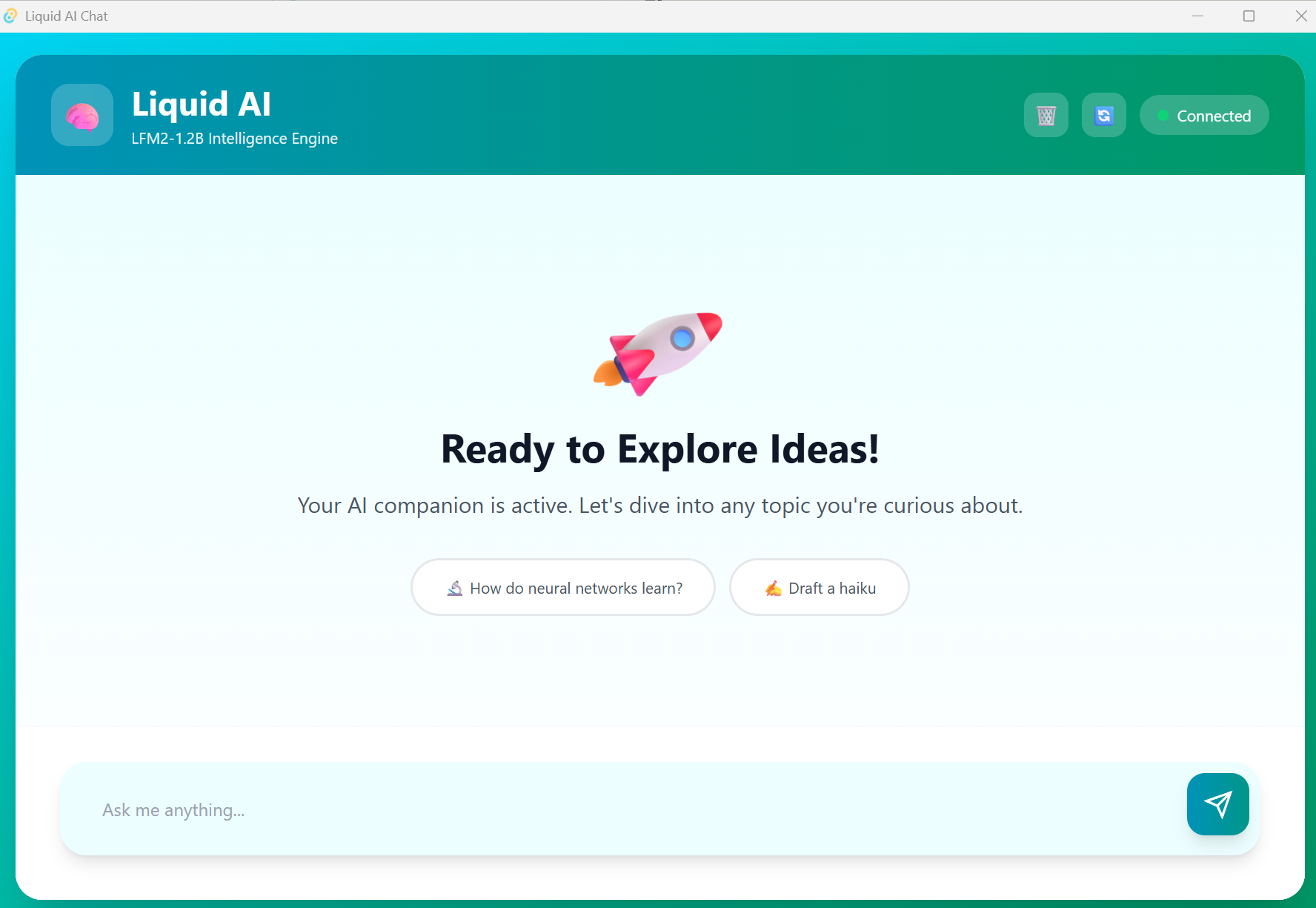
Installation puts files in C:\Users\<username>\AppData\Local\tauri-app on Windows, with the model stored in ~/.tauri-llm-app/models/. This keeps the application files separate from user data, making updates cleaner.
Startup time is 5-10 seconds with model loading. Most of that is llama.cpp initializing the model in memory. Inference speed depends on hardware—modern CPUs get 10-20 tokens/second, while GPUs can hit 100+ tokens/second.
Memory usage sits around 1-2GB with the model loaded. The model itself takes most of that; the Python and Rust layers are minimal overhead.
This specific application demonstrates a pattern that extends far beyond LLM chat apps.
The Bigger Picture
This architecture works for any Python backend, not just LLM applications. Image processing, data analysis, scientific computing—if your backend logic is Python but you want a native desktop UI, this pattern fits.
The key insight: PyInstaller spec files are the secret weapon. Real applications need custom specs that handle binary dependencies, data files, and hidden imports. Once you understand spec files, bundling Python apps becomes straightforward.
Tauri’s sidecar pattern keeps things clean. The Python backend and Rust frontend are separate processes communicating over HTTP. This separation makes development easier and makes the architecture more resilient—one component crashing doesn’t take down the other.
End users just double-click and run. No Python installation, no virtual environments, no “works on my machine” debugging sessions. That’s the workflow improvement that matters.
Future improvements could include model swapping without reinstall, conversation persistence with SQLite, system tray integration, and better error handling for network issues. But the foundation is solid—a pattern for building distributable desktop apps with Python backends that actually works.
The complete code is on GitHub. Clone it, modify it for your use case, and ship desktop apps that don’t make users suffer through dependency management.
See you in the next one,
Benito
I don’t write just for myself—every post is meant to give you tools, ideas, and insights you can use right away.
🤝 Got feedback or topics you’d like me to cover? I’d love to hear from you. Your input shapes what comes next!