

Exploring AWS Bedrock AgentCore and Strands Agents
Testing AWS's New Agent Infrastructure: Runtime, Gateway, Memory, and Auth.

AWS released AgentCore for general availability in October 2025, and I wanted to kick the tires. The pitch sounded compelling: deploy AI agents with any framework, get managed memory and tool access, and let AWS handle the infrastructure. Framework-agnostic, model-agnostic, production-ready.
But I’m skeptical of marketing claims. So I built a test system to see what actually works. Not a production application—just an exploration of the core components to understand how they fit together and where the rough edges are.
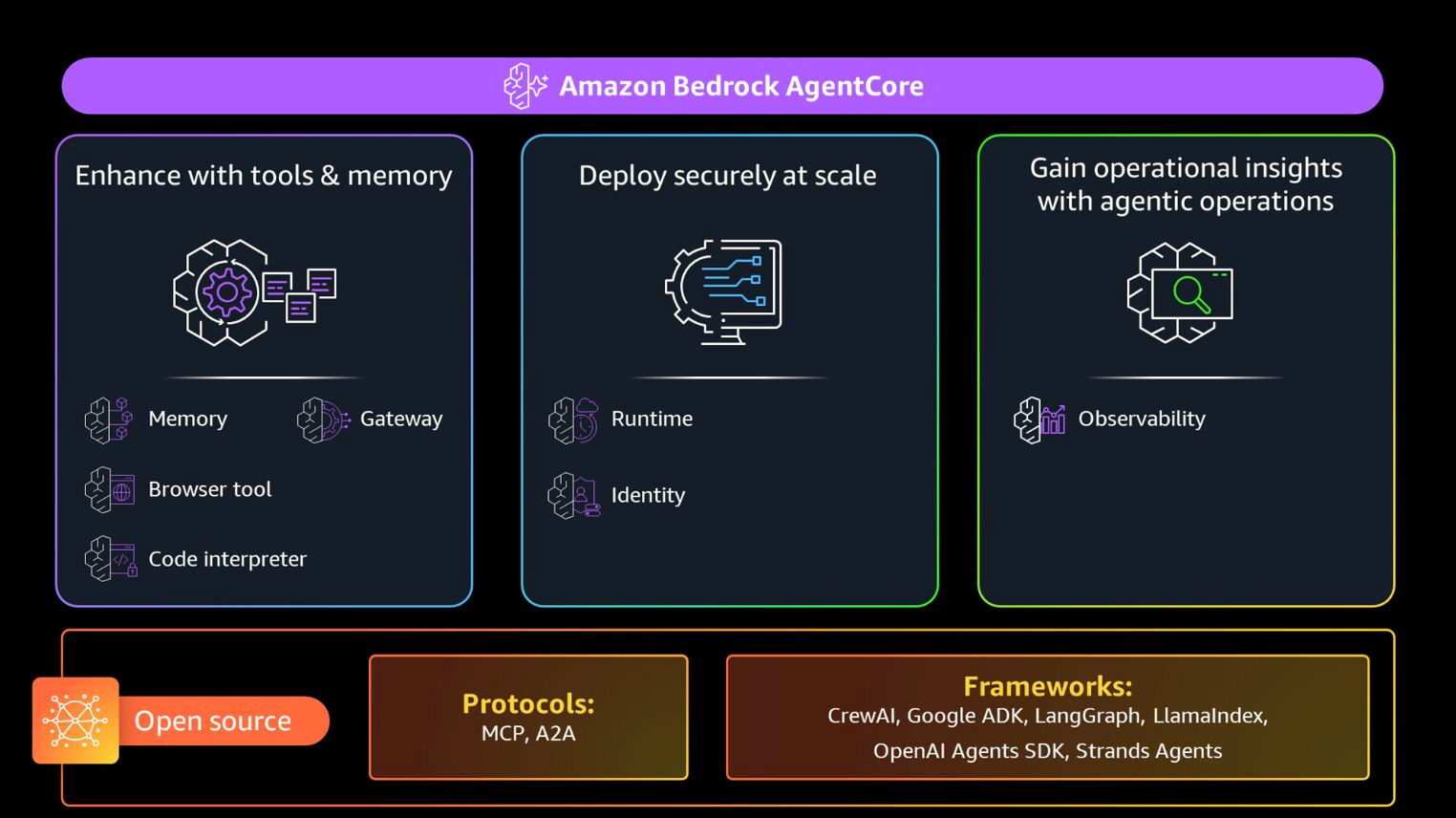
What I tested: AgentCore Runtime for serverless deployment, Gateway for tool management via MCP protocol, Memory for conversation persistence, and Cognito for user authentication. For the agent framework, I used Strands—an open-source SDK built by AWS that plays well with AgentCore’s infrastructure. The goal was simple: build a multi-turn conversational agent where different users get their own memory, tools are accessed securely through the Gateway, and everything persists across sessions.
Here’s what I learned after spending some time exploring with it.
Why Strands Agents?
Before jumping into the infrastructure, let me explain the framework choice. AgentCore is infrastructure—it doesn’t care what agent framework you use. But your framework choice matters for how cleanly everything integrates.
Strands is an open-source agentic framework developed by AWS that’s designed specifically to work with AWS services. Think of it as AWS’s answer to LangChain or LlamaIndex, but built with native AWS integrations from the ground up.
What makes Strands different: it’s model-agnostic (works with any LLM provider), supports multi-agent patterns out of the box, and has first-class integrations with AgentCore, Bedrock Guardrails, and OpenTelemetry for observability.
The SDK provides simple primitives for building multi-agent systems: handoffs between agents, swarm patterns, and graph-based workflows. It also has built-in support for A2A (Agent-to-Agent) protocol.
For this exploration, Strands made sense because it’s built to deploy on AgentCore Runtime with minimal configuration. The integration is tight—native support for AgentCore Memory, seamless Gateway connections via MCP, and hooks that let you plug into the agent lifecycle.
You can use other frameworks with AgentCore (LangGraph, CrewAI, custom code), but Strands removes friction. The deployment pattern is identical regardless of framework (you write an entrypoint function), but Strands provides abstractions that make working with AWS services cleaner.
Now, with the framework context out of the way, let's look at what AgentCore actually provides.
The Core Components: What They Actually Do
AgentCore isn't one service. It's a collection of composable pieces that solve different problems. You can use them together or independently, which is both powerful and slightly confusing at first.
Let’s start with where your code actually runs.
Runtime: Where Your Agent Lives
Runtime is a serverless environment for running agents. Any framework works—Strands, LangGraph, CrewAI, whatever. You write an entrypoint function that takes a request payload and returns a response. AgentCore handles scaling, session isolation, and deployment.
The entrypoint pattern is straightforward. Here’s what mine looked like:
from bedrock_agentcore.runtime.app import BedrockAgentCoreApp

app = BedrockAgentCoreApp()

@app.entrypoint
def invoke(payload: dict[str, Any], context: Any) -> dict[str, Any]:
    prompt = payload.get("prompt", "")
    bearer_token = extract_token_from_context(context)

    # Your agent logic here
    with StrandsAgentWrapper(
        actor_id=actor_id,
        session_id=session_id,
        gateway_url=gateway_url,
        access_token=bearer_token,
    ) as agent:
        response = agent.run(prompt)
        return response
What surprised me: deployment is fast. You just need to run agentcore configure to create the configuration file, and then agentcore deploy that takes your local Python code, packages it, deploys it to AWS, and gives you an HTTPS endpoint.
The session isolation is real. Each user gets their own microVM environment. This matters for agents that maintain complex state or perform privileged operations. Your agent isn’t sharing resources with someone else’s agent.
But having a place to run your agent is only half the picture. Agents need tools.
Gateway: The Tool Management Layer
Gateway converts Lambda functions into MCP-compatible tools that agents can discover and use. MCP (Model Context Protocol) is becoming the standard for agent-tool communication, and Gateway handles the translation.
I deployed three simple tools: a calculator, a timestamp generator, and an S3 document reader. Each tool is a Lambda function with a corresponding JSON schema that defines inputs and outputs:
{
  "name": "read_s3_document",
  "description": "Reads a document from an S3 bucket",
  "inputSchema": {
    "type": "object",
    "properties": {
      "bucket": {"type": "string"},
      "key": {"type": "string"}
    }
  }
}
The elegant part: agents discover these tools automatically. When your agent connects to Gateway, it gets a list of available tools with their schemas. The LLM decides which tools to call based on the user’s query. No hardcoded tool selection logic.
Gateway also handles the security boundary. Tools run in Lambda with their own IAM permissions. The Gateway mediates access, so your agent can’t directly call Lambda—it goes through Gateway’s authentication layer first.
But tools are useless without context, though. That's where Memory comes in.
Memory: Conversations That Persist
Memory manages conversation history per user and session. This is where actor_id becomes critical. Each user gets a unique actor_id (derived from their JWT token), and Memory stores their conversation history separately.
The integration with Strands agents uses hooks, meaning callback functions that run at specific points in the agent lifecycle. I implemented two hooks:
Agent initialization: Load the last 10 conversation turns from Memory and inject them into the system prompt
Message added: Save each message (user and assistant) back to Memory
This creates true multi-turn conversations. Close your terminal, come back three days later, and the agent remembers everything. The conversation context lives in Memory, not in your local session.
What actually works: the memory persistence is solid. I tested closing sessions, restarting servers, and coming back hours later. Context was always there. The challenge is managing token limits as conversations grow. You need summarization eventually, but that’s your problem to solve, not AgentCore’s.
But we are still missing a critical piece: who is this conversation for? This is where we can use AWS Cognito capabilities to manage authentication.
Cognito: The Identity Piece
Cognito provides JWT-based authentication for Gateway access. This is where the system shows its elegance: the same token that authenticates your Gateway request also identifies who you are for Memory.
Here’s the flow:
User authenticates with Cognito (username/password, OAuth)
Cognito issues a JWT access token
Agent includes token in Gateway requests:
Authorization: Bearer <token>Gateway validates the token and allows tool access
Agent extracts user identity from the same token (the
subclaim) and uses it as actor_id for Memory
One token, two purposes. Authentication for Gateway, identification for Memory. This removes a lot of complexity.
The setup required creating a User Pool, configuring an OAuth client, and wiring it to Gateway’s authorizer configuration. There’s one gotcha: Cognito’s SECRET_HASH requirement. When using OAuth with a client secret, you can’t just send the client ID—you need to compute an HMAC-SHA256 hash of the username and client ID using the secret. The docs mention this, but it’s easy to miss.
That’s the theory. Here’s how it actually goes together.
The Setup Flow: From Zero to Deployed
The Makefile in my repo shows the dependency chain. Each step builds on the previous one:
Step 1: Create S3 bucket
make agentcore-s3-setupThis creates a bucket for documents that tools can read. Simple, but necessary before deploying the Lambda that accesses it.
Step 2: Deploy Lambda tools
make agentcore-lambda-deployPackages the Lambda handler, creates an IAM role with S3 read permissions, and deploys the function. The deployment script handles retries because sometimes IAM roles aren’t immediately assumable after creation—AWS eventual consistency strikes again.
Step 3: Wire up Gateway and Cognito
make agentcore-gatewayThis is the complex one. It creates the Cognito User Pool, registers an OAuth client, creates the Gateway, associates the Lambda with the Gateway, and configures the authorizer. The script stores the client secret in AWS Secrets Manager so you don’t have it floating around in environment variables.
Step 4: Create a test user
uv run scripts/setup_user_auth.pyCreates a user in Cognito, gets an access token, and verifies the JWT payload contains the expected claims. This also tests that the authentication flow actually works before you try using it with the agent.
Step 5: Add runtime permissions
This is where I hit a wall initially. The Runtime execution role needs explicit permissions to access the Gateway and Memory. The deployment tools don’t add these automatically, so your agent gets “access denied” errors when trying to list Gateway tools or load Memory sessions.
uv run scripts/setup_runtime_permissions.pyThis script adds IAM policies for bedrock-agentcore:ListGateways, bedrock-agentcore:GetMemory, bedrock-agentcore:PutEvents, and other required operations. Without this step, nothing works.
Step 6: Deploy the agent
agentcore configure --entrypoint runtime_handler.py
agentcore deploy
The configuration asks for several parameters and creates the yaml file. You can leave the default values, but you need to add the parameters from the previously created Gateway, like in the image below.
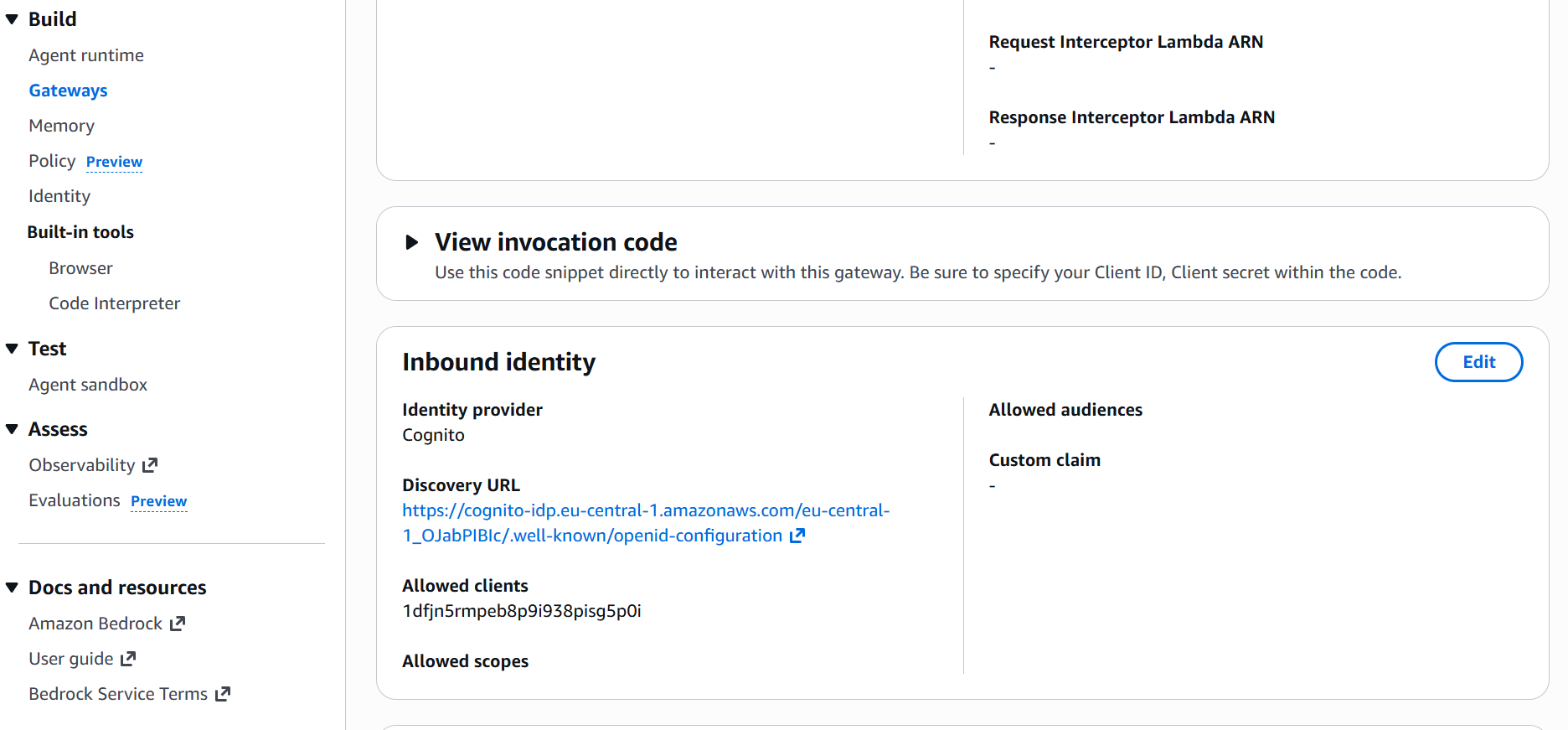
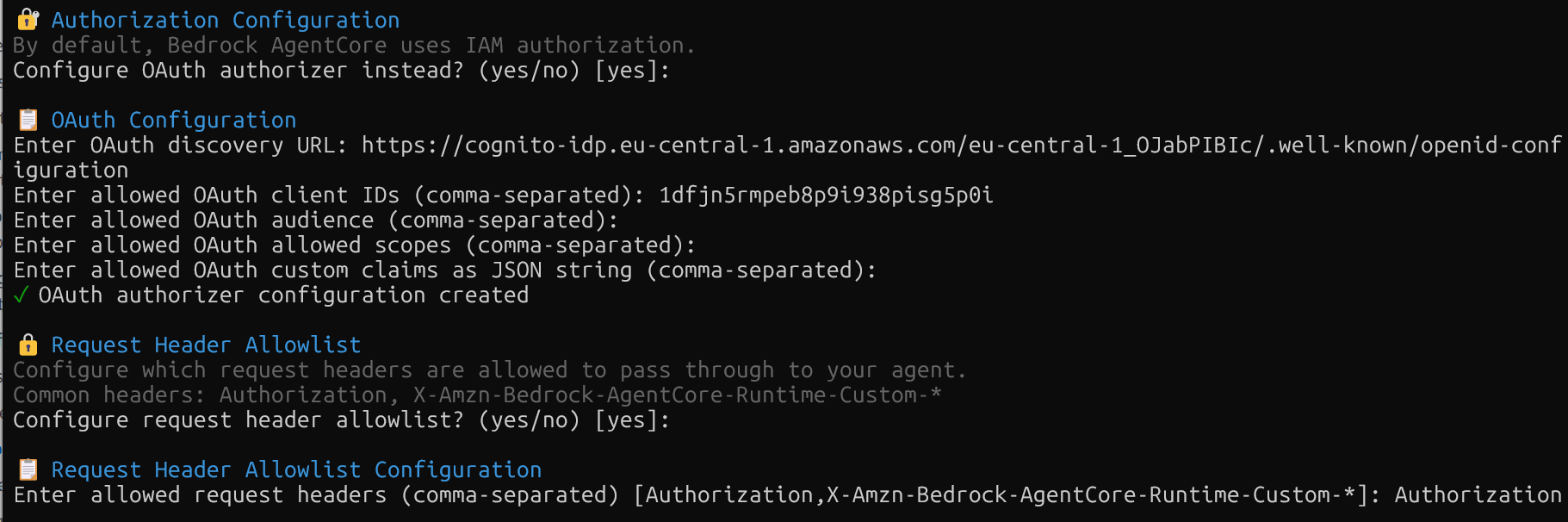
The deployment packages the code and pushes it to AWS. You get an HTTPS endpoint that accepts JSON payloads with a prompt field and Authorization header.
So that's the process on paper. Here's what actually happened when I ran through it.
What Actually Happened
What Worked
The toolkit (bedrock-agentcore-starter-toolkit) handles most of the complexity. Creating Gateway targets, wiring up OAuth, managing checkpointer connections, all abstracted away. You call functions like client.create_mcp_gateway() and it works.
from mcp.client.streamable_http import streamablehttp_client

self.mcp_client = MCPClient(
    lambda: streamablehttp_client(
        gateway_url,
        headers={"Authorization": f"Bearer {access_token}"}
    )
)
self.mcp_client.__enter__()
tools = self.mcp_client.list_tools_sync()
Memory “just worked” once configured. The hooks pattern in Strands made it easy to plug in Memory persistence without touching the agent’s core logic. Load history on initialization, save messages on each turn, done.
The MCP abstraction makes sense. One protocol for all tools, regardless of whether they’re Lambda functions, HTTP APIs, or something else. This is the right way to standardize agent-tool communication.
What Surprised Me
Token flow was simpler than expected. I initially thought I’d need separate tokens for Gateway authentication and user identification. Turns out, the JWT from Cognito serves both purposes. Extract the sub claim for actor_id, use the whole token for Gateway auth. One token, zero duplication.
agentcore deploy is surprisingly fast. From running the command to having a working endpoint took about 90 seconds. No Docker build, no container registry push, no waiting for Lambda layers. It just deploys.
Secrets Manager integration for client_secret. The toolkit automatically stores the OAuth client secret in Secrets Manager and retrieves it when needed. This is good security hygiene, but adds a dependency on Secrets Manager that’s not immediately obvious.
What I’d Test Next
Multiple agents working together would be interesting. AgentCore supports this, but I didn’t explore it.
The Browser and Code Interpreter services are available but I didn’t use them. Browser gives agents a headless Chrome instance for web interaction. Code Interpreter provides a sandboxed Python environment for running generated code. Both could be powerful, but they add complexity.
Policy controls just launched and is in preview mode. You can now define fine-grained rules about what actions agents can take, which tools they can access, and under what conditions. This matters for production systems where you need guardrails. I’d test how these policies interact with existing IAM permissions and whether they cover the edge cases that matter.
After building this system, here's my honest assessment.
The Real Trade-offs
AgentCore is very new. It went from preview (July 2025) to GA (October 2025) in just three months. The service is barely two months old at general availability. The core functionality works, but the developer experience has rough edges.
The composability is real. You can use Gateway without Runtime, or Memory without Gateway. But understanding how pieces fit together requires reading multiple docs and examples. There’s no single “getting started” guide that shows the full system.
Framework flexibility works. I used Strands, but LangGraph, CrewAI, and custom frameworks all work the same way. You provide an entrypoint function, AgentCore calls it. No lock-in.
The AWS-managed infrastructure is the selling point. If you’re already on AWS and want agent infrastructure without managing servers, this makes sense. If you’re building on GCP or Azure, or if you want full control over the deployment stack, this isn’t for you.
Cost is opaque. There are charges for requests, session time, event, tokens, or tool calls. For small projects, it’s cheap. At scale, it’s hard to predict costs without running it in production.
If you want to try this yourself, here’s the complete setup.
Running It Yourself
The complete setup is in my GitHub repo. You’ll need:
AWS CLI configured
OpenAI API key (for the LLM)
uvfor Python dependency management
Clone the repo:
git clone https://github.com/benitomartin/agentcore-agents
cd agentcore-agents
Install dependencies:
uv syncConfigure environment variables in .env:
cp .env.example .envRun the setup sequence:
make agentcore-s3-setup
make agentcore-lambda-deploy
make agentcore-gateway
uv run scripts/setup_user_auth.py
uv run scripts/setup_runtime_permissions.py
agentcore configure --entrypoint runtime_handler.py
agentcore deploy
Test locally before deploying:
uv run tests/test_agent_with_user_identity.py
uv run tests/test_gateway_auth_rejection.py
This creates a Cognito user, obtains a token, runs queries through the Gateway, or rejects them due to a missing authenticated user. It then creates a memory (which takes 2-3 minutes) and verifies Memory persistence with some queries included in the test script. If this works locally, deployment will work.
To test the runtime of the deployed agent, you must first create a token and then execute a query. The repository contains a detailed README.md file with all the commands.
TOKEN=$(uv run python -c "
from agentcore_agents.auth.cognito import get_user_token
from agentcore_agents.auth.secrets_manager import get_client_secret
from agentcore_agents.gateway.setup import GatewaySetup
from agentcore_agents.config import settings

setup = GatewaySetup()
client_info = setup.get_client_info_from_gateway()
client_secret = get_client_secret(settings.gateway.name, setup.region)
token_data = get_user_token(
    client_info['client_id'],
    client_secret,
    'testuser',
    'TestPassword123!'
)
print(token_data['access_token'])
")

agentcore invoke '{"prompt": "Can you tell me how many documents are in the S3 bucket?"}' --bearer-token "$TOKEN"
Once you finish, do not forget to delete all created resources to avoid unnecessary charges.
Conclusion
AgentCore is interesting precisely because it’s so new. Released just a few months ago, it solves real problems: serverless agent deployment, tool discovery via MCP, conversation persistence, and user authentication. These are table stakes for production agent systems, and AWS is moving fast to provide them.
The composability matters. You can adopt Gateway without using Runtime, or use Memory with a different deployment model. This is better than all-or-nothing platforms.
The framework flexibility is real. I used Strands, but the entrypoint pattern works with any Python code. LangGraph users, CrewAI users, custom framework users, everyone gets the same infrastructure.
The rough edges are expected for a service barely two months old at GA. Manual IAM permission fixes, unclear cost models, and scattered documentation will improve over time. But right now, you need to be comfortable debugging AWS IAM issues and reading source code to figure out how pieces connect.
If you’re building agents on AWS and want managed infrastructure, test AgentCore. The core functionality works. But expect to spend time understanding the pieces and fixing permissions. This isn’t plug-and-play yet.
The code is on GitHub. Try it, break it, and let me know what you find.
See you soon,
Benito
I don’t write just for myself—every post is meant to give you tools, ideas, and insights you can use right away.
🤝 Got feedback or topics you’d like me to cover? I’d love to hear from you. Your input shapes what comes next!
Really appreciate the hands-on approach here instead of just parotting AWS marketing material. The insight about JWT tokens serving double duty for Gateway auth and Memory identity is exactly the kind of detail that saves hours of debugging. I spent way too long trying to implement seperate token flows in a previous project. Clear walkthrough with actual gotchas documented is rare to find.