

Mastering Pydantic - Part 1: Foundation and Core Concepts
Building reliable data models for data science, ML and AI applications

Pydantic has become an essential tool for data validation and settings management in Python applications. Whether you're building data pipelines, training machine learning models, or developing AI applications with LLM integrations, Pydantic's configuration system offers powerful features that can significantly improve your workflows.
In this first part of the article series, we'll explore the foundational concepts that form the backbone of effective Pydantic usage: model configuration, field definitions, and settings management. These concepts will prepare you for the advanced validation techniques we'll cover in subsequent tutorials.
Understanding ConfigDict: The Heart of Model Behavior
The ConfigDict class in Pydantic allows you to control the behavior of your models using a type-safe TypedDict. It supports 40+ parameters for customizing validation, serialization, immutability, and other model features. Below is an example of a basic configuration:
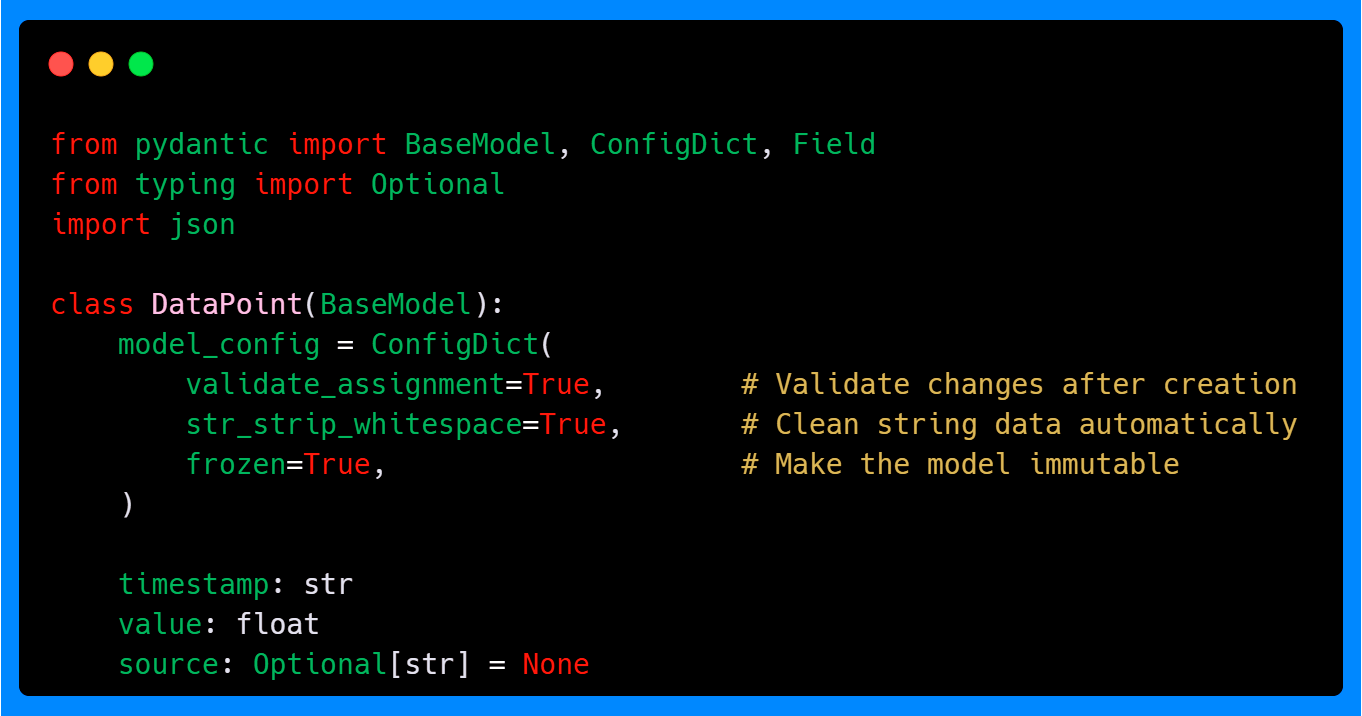
In this example, we're setting three important configuration options. The validate_assignment parameter True ensures that any changes to model attributes after creation are validated according to the field definitions. With the default value False, validation still occurs during initial creation, but subsequent attribute assignments bypass validation. This is particularly useful when you're working with data that gets modified throughout your pipeline—you'll catch type errors immediately rather than discovering them later when they cause downstream failures.
The str_strip_whitespace option is also set to True to remove leading and trailing whitespace from string fields automatically. This addresses a common data quality issue where CSV files or API responses contain extra spaces that can cause problems in analysis or model training.
Finally, frozen makes the model immutable after creation if it is also True. This is a great way to enforce data integrity, ensuring that once a model is created, its attributes cannot be altered. This is especially useful in scenarios where your data represent fixed observations or measurements.
Let's see these configurations in action:
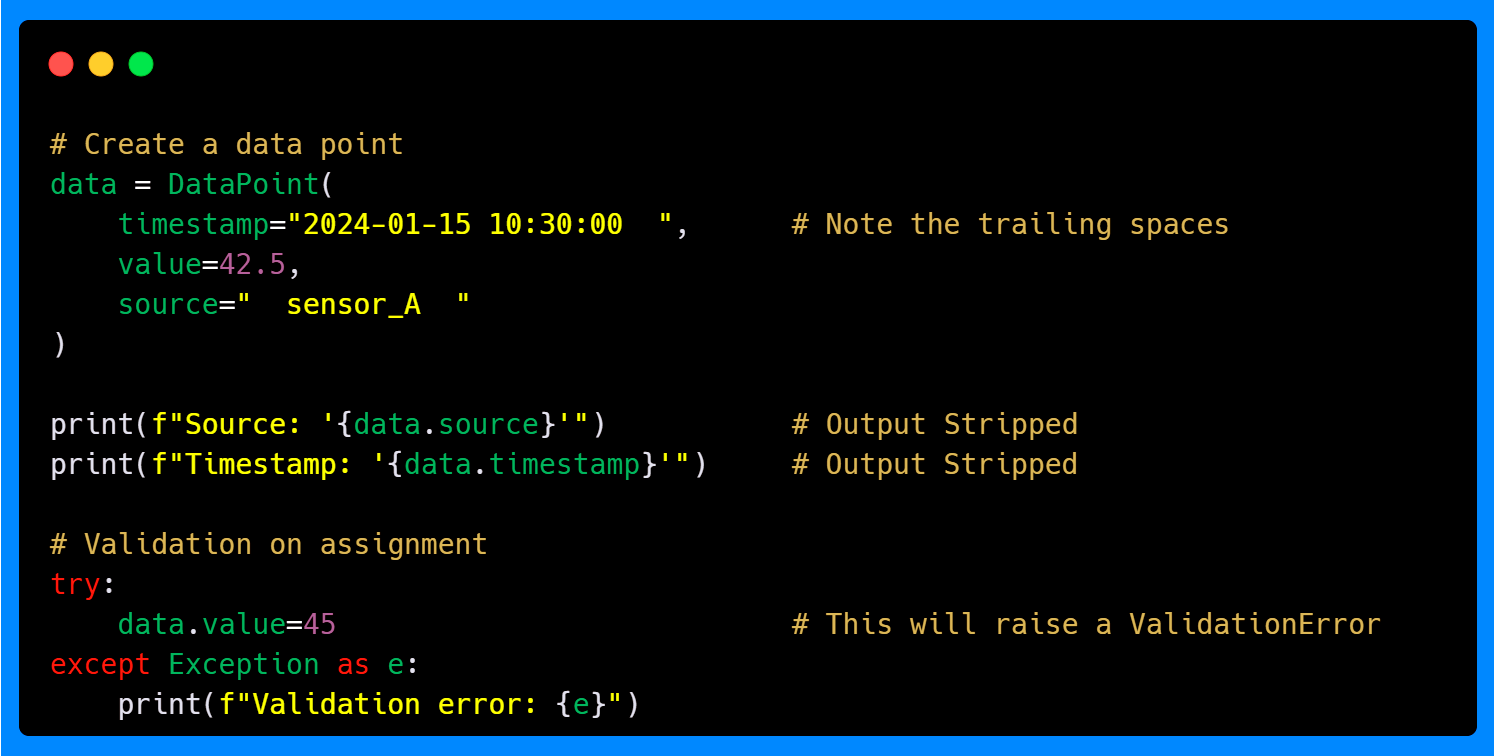
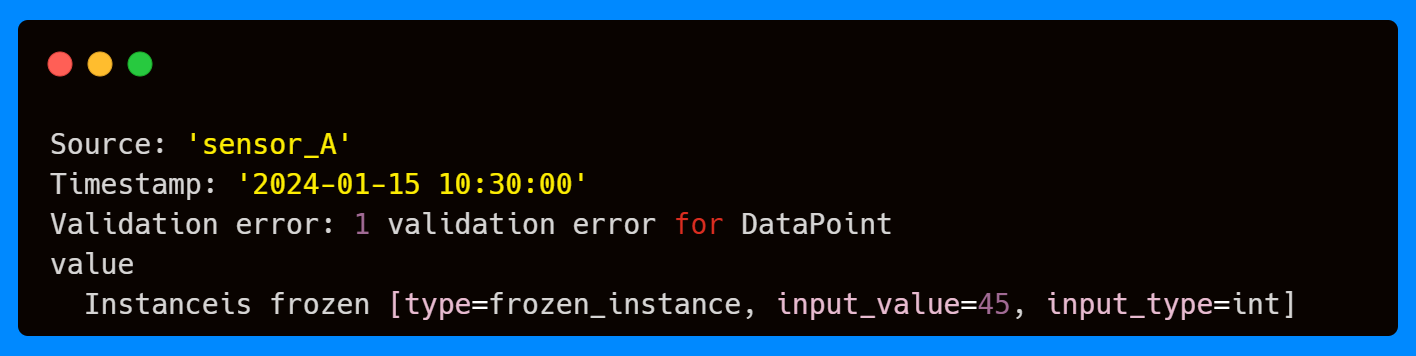
The whitespace stripping happens automatically during model creation, cleaning your data without requiring explicit preprocessing steps. When we attempt to assign a new value to the value field, the validation triggers immediately due to the frozen status, preventing invalid data from propagating through your system. Even if you try to assign the same value as the default 42.5, you will get a validation error.
If you're enjoying this content, consider joining the AI Echoes community. Your support helps this newsletter expand and reach a wider audience.
Key ConfigDict Parameters
As mentioned above ConfigDict accepts over 40 parameters, but below you can see some of them that are especially useful for machine learning and AI applications:

The arbitrary_types_allowed parameter is particularly interesting because, when set to True, it allows you to use types like NumPy arrays, pandas DataFrames, PyTorch tensors, or custom objects that don't have built-in Pydantic support, like lists, floats, and dictionaries (the complete list of supported types can be found here). Without this setting, you'd get validation errors when trying to include these common ML/AI types in your models.
The extra parameter with the forbid option prevents your model from accepting fields that aren't explicitly defined. This is valuable when processing data from external APIs or files where unexpected fields might indicate schema changes or data quality issues that should be addressed rather than silently ignored. Other alternatives for this parameter are ignore and allow.
The str_to_lower and str_to_upper parameters help standardize string data, which is often necessary when dealing with categorical variables or text data. Consistent casing can reduce errors during data processing and make the pipeline more robust.
Field Configuration
Fields in Pydantic offer extensive customization options beyond basic type annotations. The Field function provides fine-grained control over validation, serialization, and documentation. Similarly to ConfigDict it supports over 40 parameters for customizing validation. Below is an example of a basic configuration:
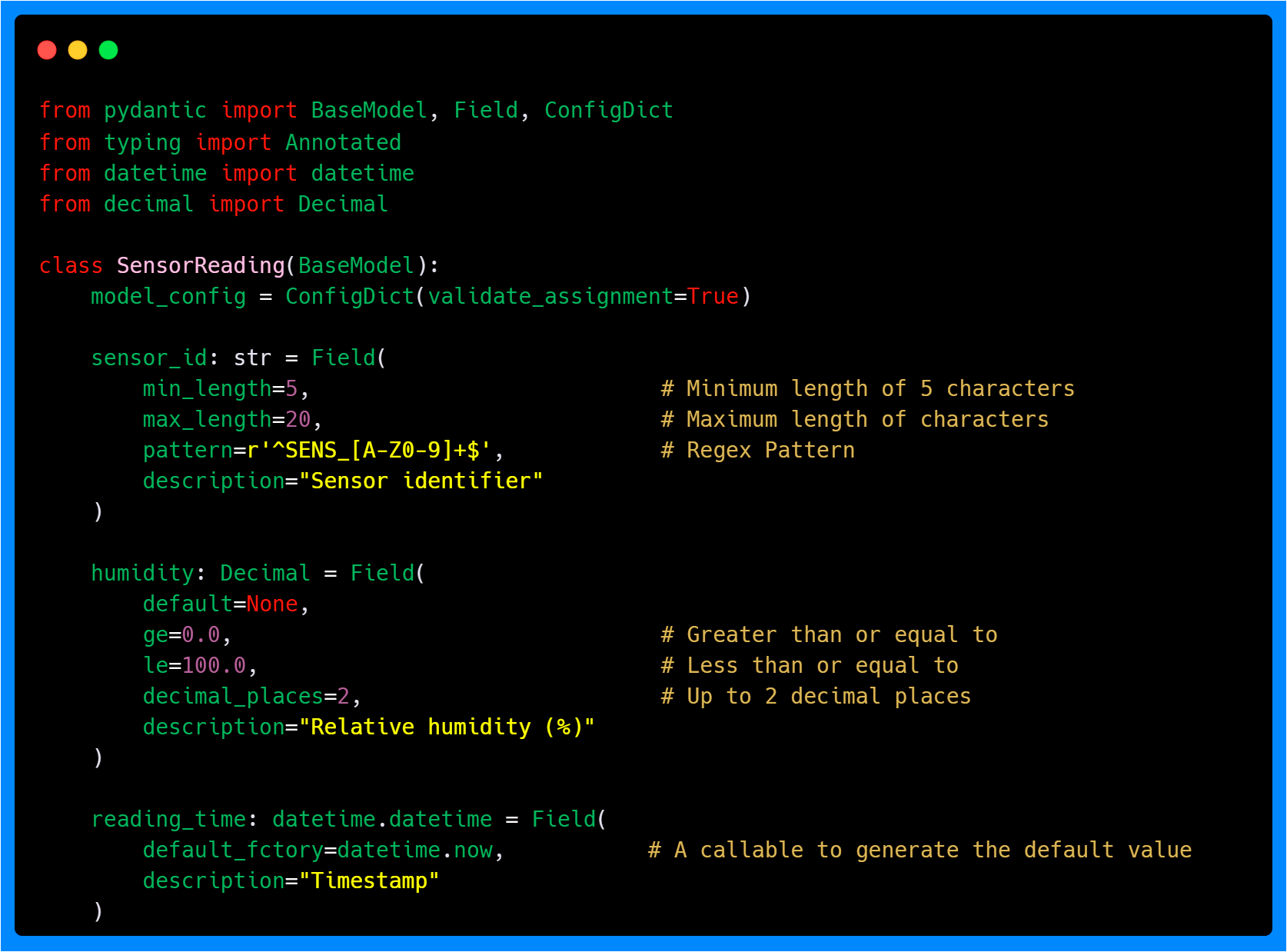
This example shows several important field configuration concepts. The sensor_id field uses a regular expression pattern to ensure sensor identifiers follow a specific format, which helps maintain data consistency across your system. Additionally, it has length constraints with the min_length and max_length parameters to prevent overly short or long identifiers.
The humidity fields use ge (greater than or equal), le (less than or equal), and decimal_places constraints to define acceptable ranges and formatting for these measurements.
The default_factory parameter deserves special attention. Unlike a simple default value, default_factory calls a function each time a new instance is created. In the above example, it ensures that each sensor reading gets the current timestamp at the moment of instantiation.
Let's see how these field configurations work in practice:
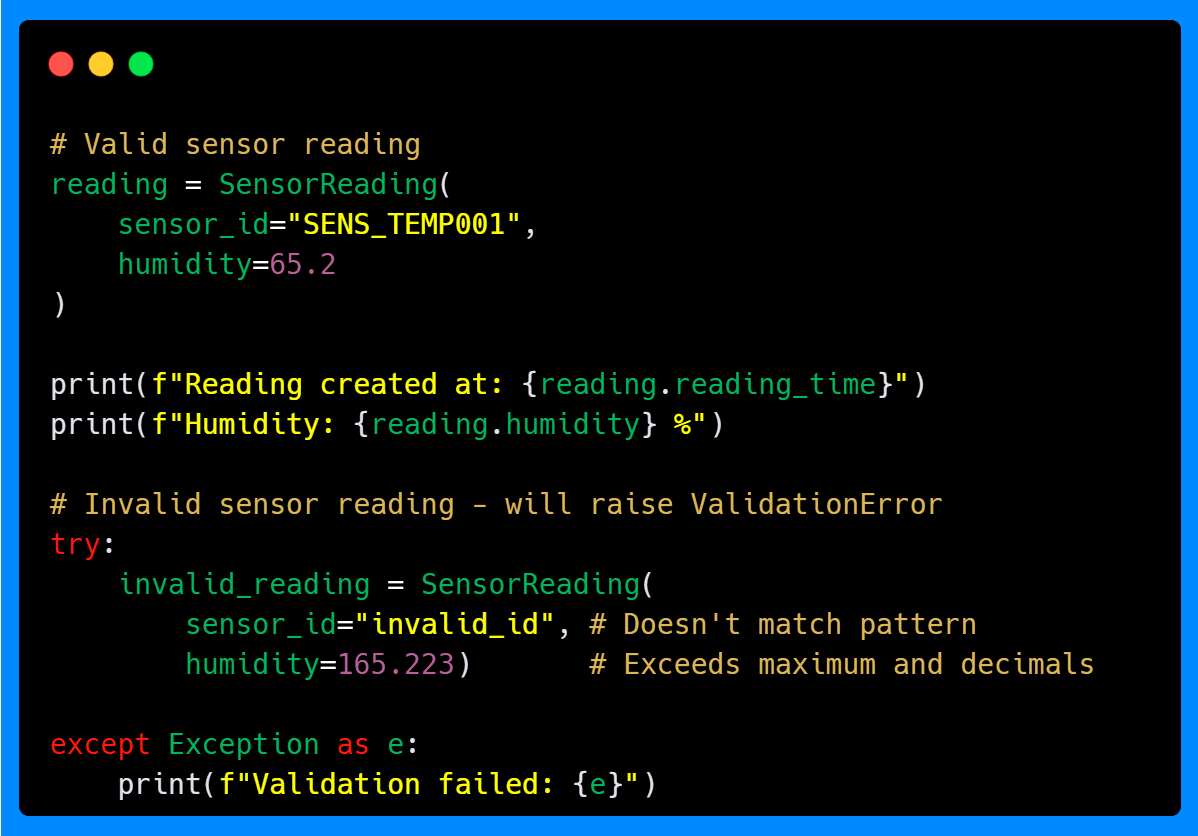
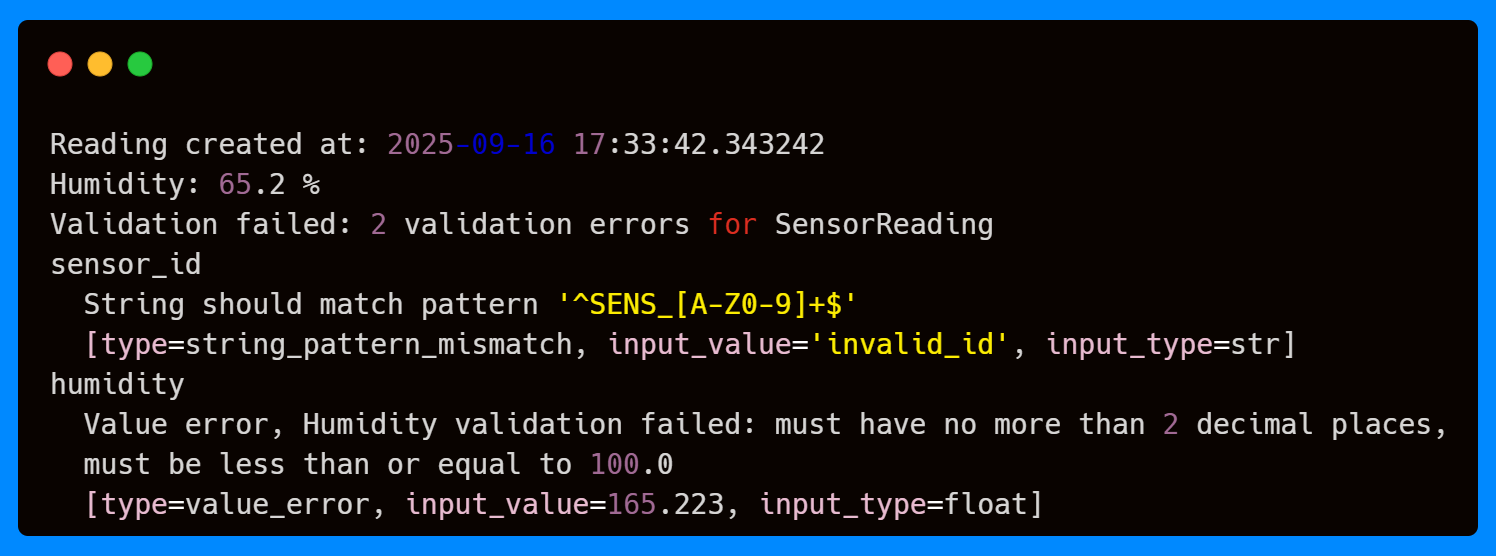
The validation system catches all errors, including the invalid sensor ID format, the out-of-range humidity, and the excessive decimal places, preventing the creation of an invalid SensorReading instance. You might have noticed that the reading_time parameter has not been added to the model instance; as with default_factory, it will be automatically created.
Field Aliases and Data Transformation
Field aliases are essential when working with external data sources that use different naming conventions than your internal models. The validate_by_name parameter of the ConfigDict allows the model to accept data using either the field names or their aliases. This flexibility is valuable when you're working with data from multiple sources or when you're gradually migrating from one naming convention to another.
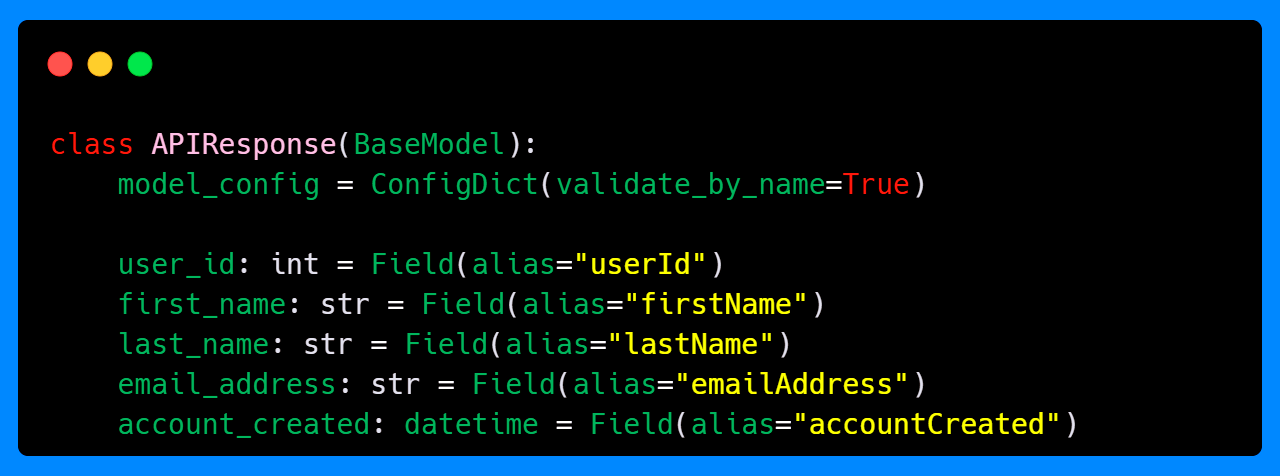
In the example below, you can see how the APIResponse model parses data from an external API that uses camelCase naming conventions and also accepts data in the internal snake_case format. Due to the validate_by_name=True setting and the field aliases, you can use the internal format to call both data and get the response.
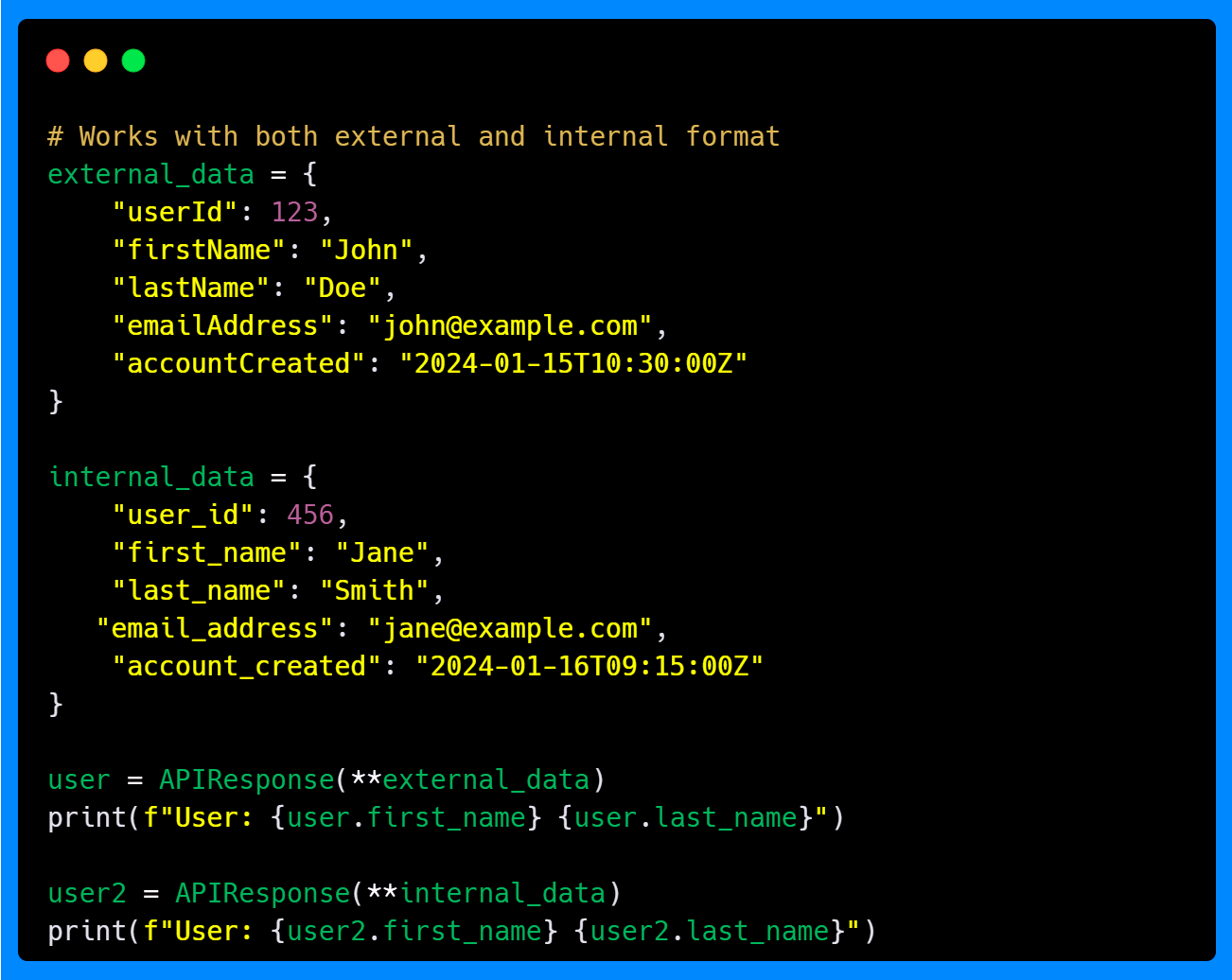

This flexibility is valuable when you're working with data from multiple sources, various data formats, or when you're gradually migrating from one naming convention to another.
Settings Management with SettingsConfigDict
Settings management is crucial in ML/AI projects, where you often need different settings for development and production environments. Pydantic's BaseSettings class, combined with SettingsConfigDict, provides a robust solution for managing configuration from environment variables.
Below is an example of how to use some of the key features of SettingsConfigDict to manage settings using environment variables from a .env file.
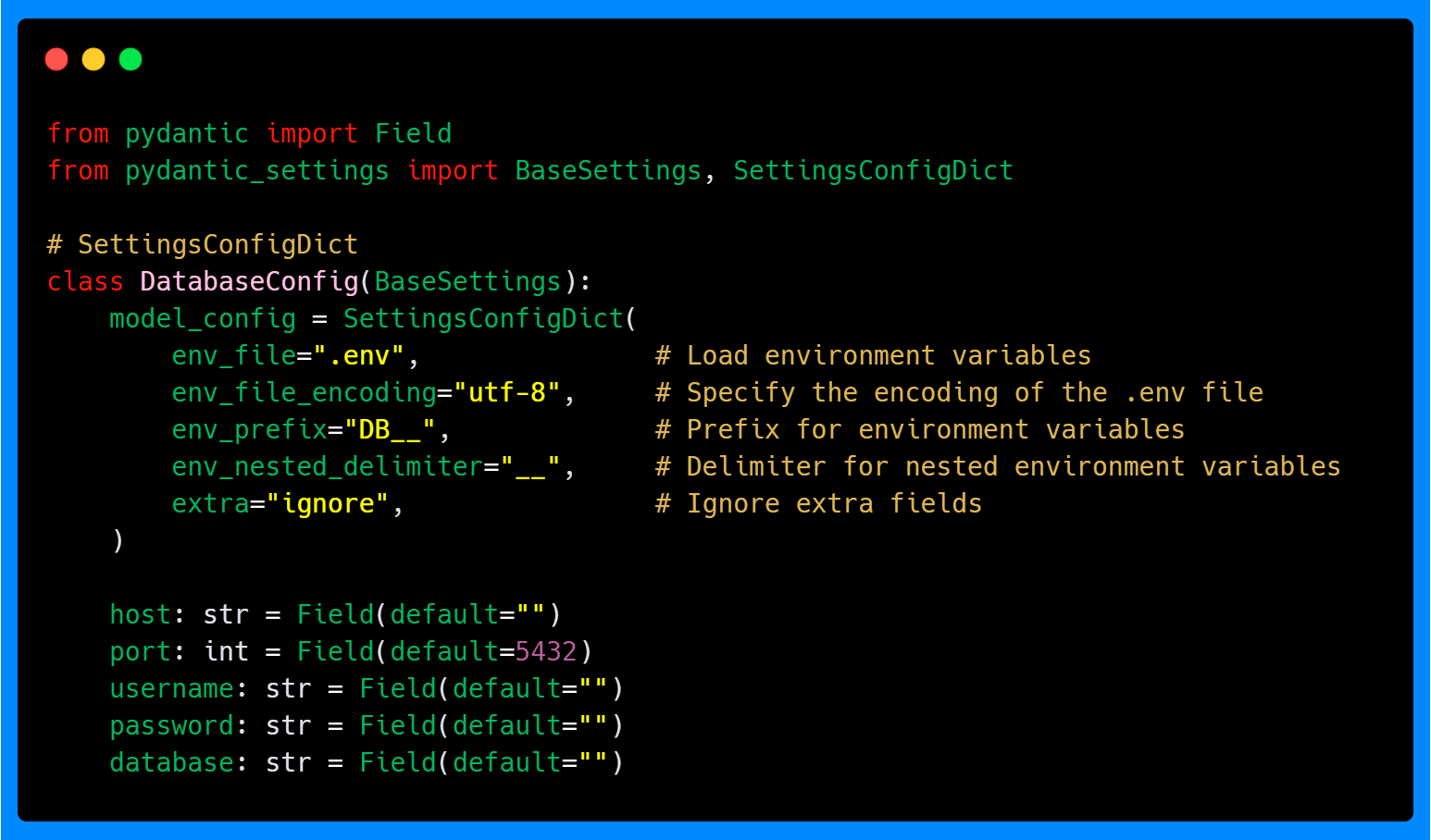
The SettingsConfigDict provides several important configuration options. The env_prefix parameter adds a prefix to environment variable names, helping organize your configuration and avoiding naming conflicts. For example, with env_prefix="DB__", the host field will look for an environment variable named DB__HOST.
Since SettingsConfigDict inherits from ConfigDict, all attributes and features available in ConfigDict are also available in SettingsConfigDict. This is the case of the extra parameter that allows the model to ignore any extra environment variables that do not correspond to fields in the settings class, preventing errors from unexpected variables coming from the .env file.
The env_nested_delimiter parameter allows you to use nested structures in environment variables. With env_nested_delimiter="__", an environment variable named ML__MODEL_PATH would map to a nested model_path structure instead of ml__model_path.
So if you have the following environment variables set with the specified prefixes and delimiters, they will automatically populate the corresponding fields in your settings classes.
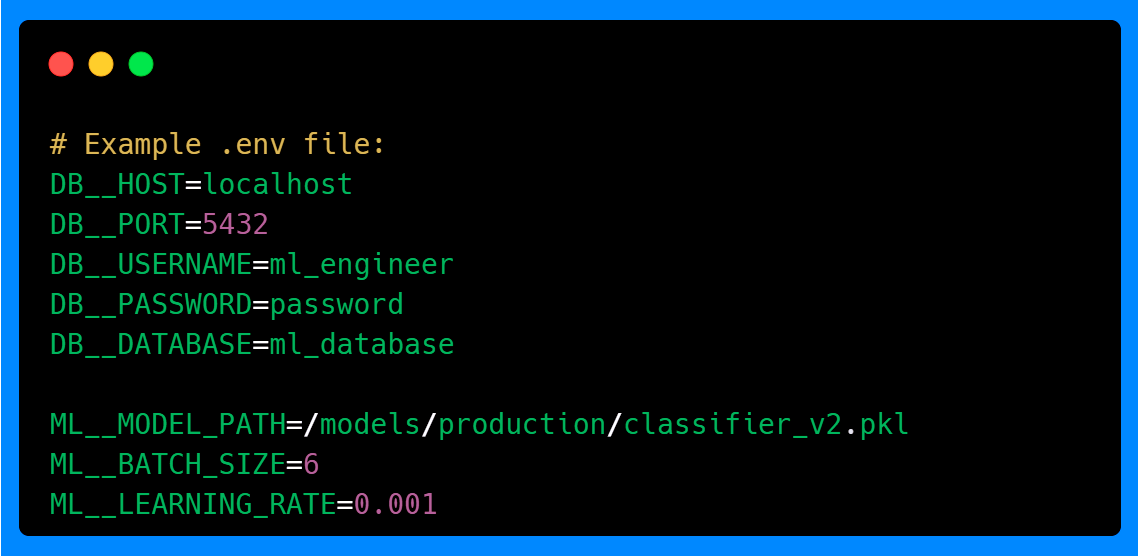
If we run the following code, we can see how the configuration is loaded and validated. The prefixed environment variables will be taken by the respective settings classes, and the nested structure will be respected.
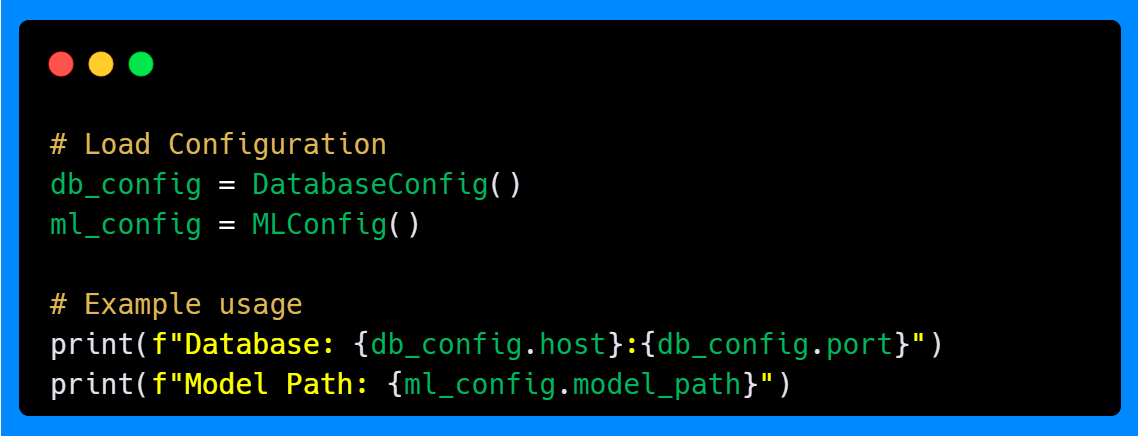
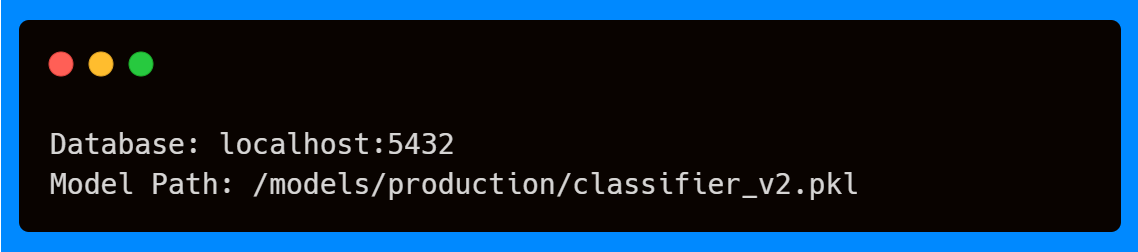
This approach to configuration management provides several advantages. The nested structure allows for better organization of related settings, making it easier to manage complex configurations. The use of prefixes helps avoid naming conflicts, especially in larger projects with multiple configuration sources. Additionally, the ability to ignore extra environment variables prevents errors from unexpected variables, making the system more robust.
Putting It All Together: A Complete Example
Let's combine these concepts in a realistic ML/AI scenario where you're building a model inference pipeline that processes data and generates predictions. This complete example shows how we can put together configuration management, data validation, and model inference in a single, reliable system. We’re using Pydantic’s ConfigDict, Field and SettingsConfigDict to make sure that both our environment settings and our data inputs are handled consistently and safely. This approach is essential for building applications that are easy to maintain and less prone to errors.
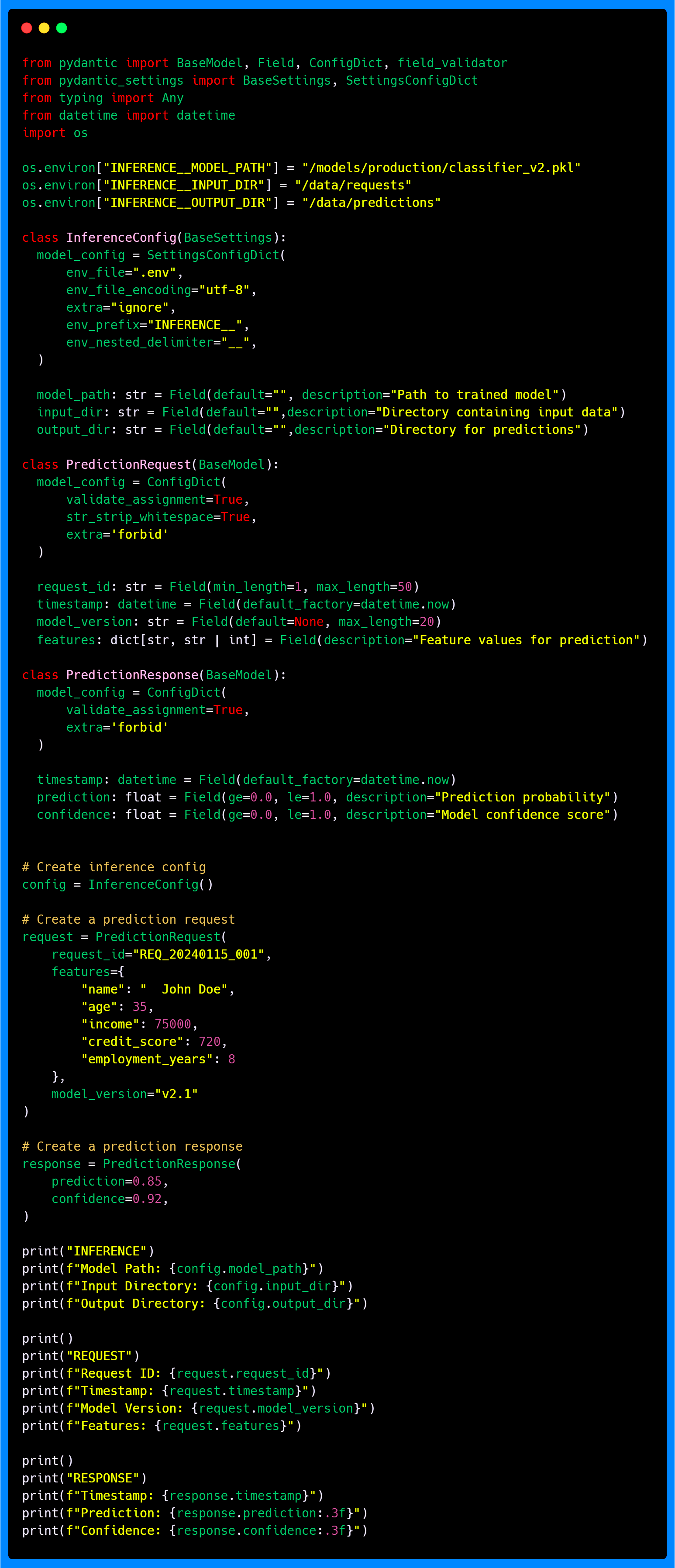
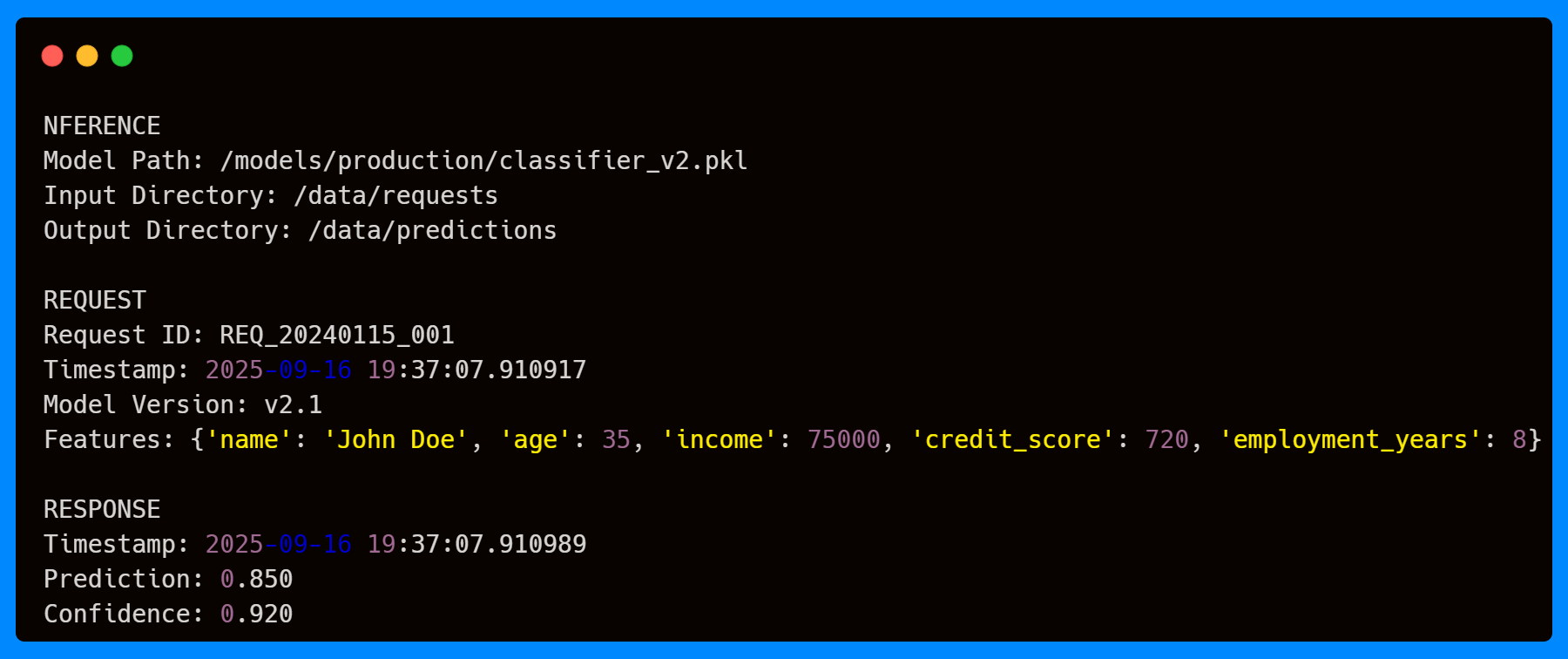
When you run the script, you’ll see that the configuration settings automatically pick up the environment variables we defined, respecting the prefix and delimiter. That means the paths for the model, input data, and output predictions are loaded properly.
On top of that, the request and response models ensure that all data is valid before the model even runs. For example, PredictionRequest makes sure that every request has a valid ID and model version as per length constraints, strips unnecessary spaces from any string variable like the name feature, and enforces the correct dictionary structure for feature data. Meanwhile, PredictionResponse checks that prediction scores and confidence values are within. The timestamp fields in both models are automatically set to the current time at the moment of creation. With these checks in place, you can trust that the data your model receives and returns is correct, making the whole inference process more reliable.
By combining automatic configuration loading with robust data validation, this setup demonstrates a practical, ready-to-use pattern for ML/AI projects. It ensures that your system not only works correctly but is also easier to maintain, debug, and scale as your application grows.
Key Takeaways
In this first part of our Pydantic series, you've learned the foundational concepts that enable effective data validation and configuration management:
ConfigDict provides fine-grained control over model behavior, with parameters like
validate_assignmentandstr_strip_whitespacethat are particularly valuable for ML/AI applications.Field definitions allow you to specify constraints, patterns, and documentation that improve data quality and system reliability.
SettingsConfigDict and BaseSettings create a robust configuration management system that works seamlessly with environment variables and configuration files.
Combining these features creates data models that are both flexible and strict, catching errors early while accommodating the realities of working with external data sources.
Together, these features allow you to handle messy, inconsistent, or complex input data with precision. Whether you’re cleaning ML datasets, validating API payloads, or building LLM-powered workflows, Pydantic ensures your systems stay robust and predictable.
In the next parts of this series, we'll explore advanced validation techniques, including built-in field/model validators, handling multiple data formats with unions, serialization, types (custom, network, extra), and how Pydantic converts compatible input types behind the scenes with coercion, reducing boilerplate while still catching invalid values.
The foundation you've built here will support these more advanced techniques, giving you the tools to create data processing systems that are both robust and maintainable.
I don’t write just for myself—every post is meant to give you tools, ideas, and insights you can use right away.
🤝 Got feedback or topics you'd like me to cover? I'd love to hear from you. Your input shapes what comes next!