

Mastering Pydantic - Part 2: Validation Techniques
Data validation with field, model, and function validators.

In Part 1, we covered the foundational concepts of Pydantic: model configuration, field definitions, and settings management. Now we'll dive into where Pydantic truly excels—handling complex validation scenarios and transforming messy real-world data into clean, structured formats.
ML and AI applications often deal with data from multiple sources, inconsistent formats, and complex validation requirements. Whether you're processing training data, validating API inputs for model inference, or handling LLM responses, advanced validation techniques will help you build robust systems that gracefully handle edge cases and data quality issues.
Pydantic organizes validation into three main types:
Field Validators (
@field_validator) – Validate individual fields.Model Validators (
@model_validator) – Validate entire models.Function Validators (
@validate_call) – Validate function arguments.
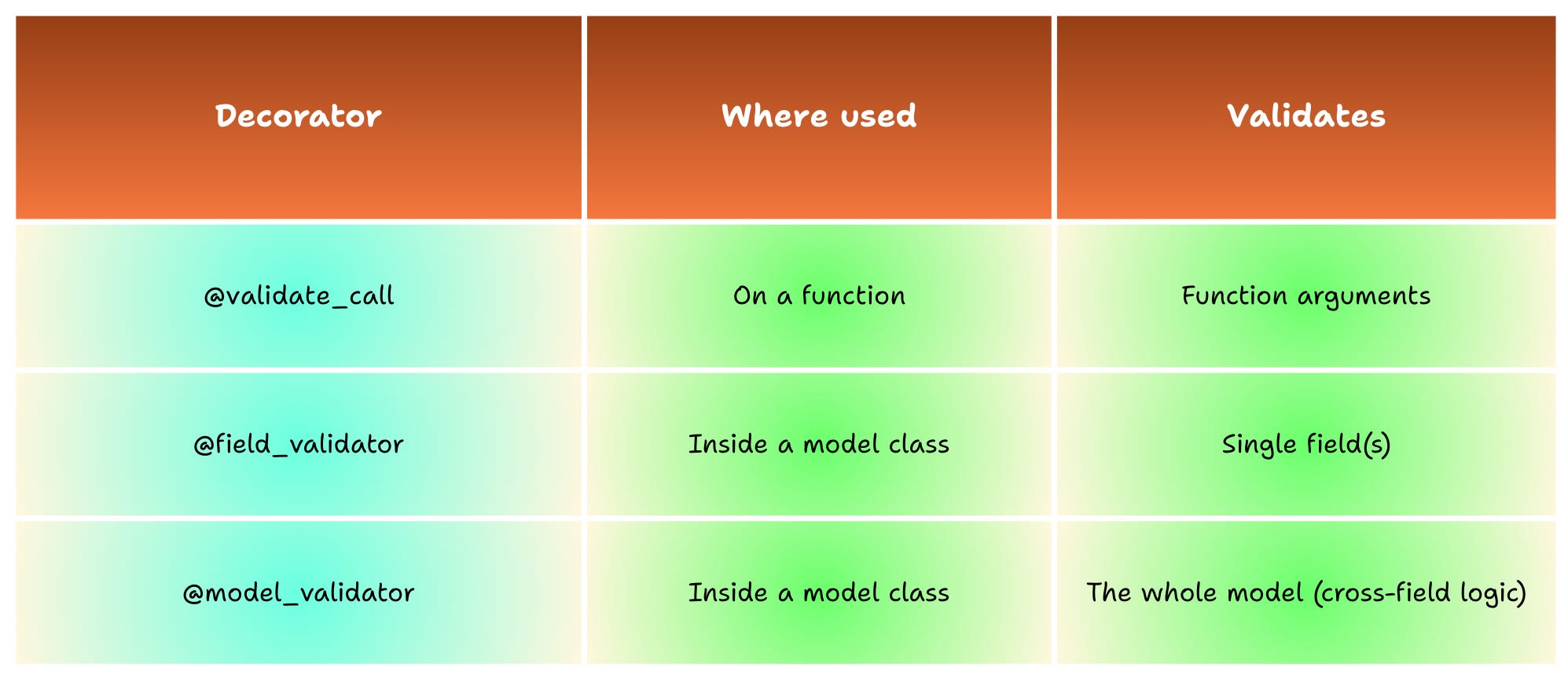
Field and model validators can also be classified by mode, depending on when and how you want to perform the validation, which we will cover in more detail in the next sections.
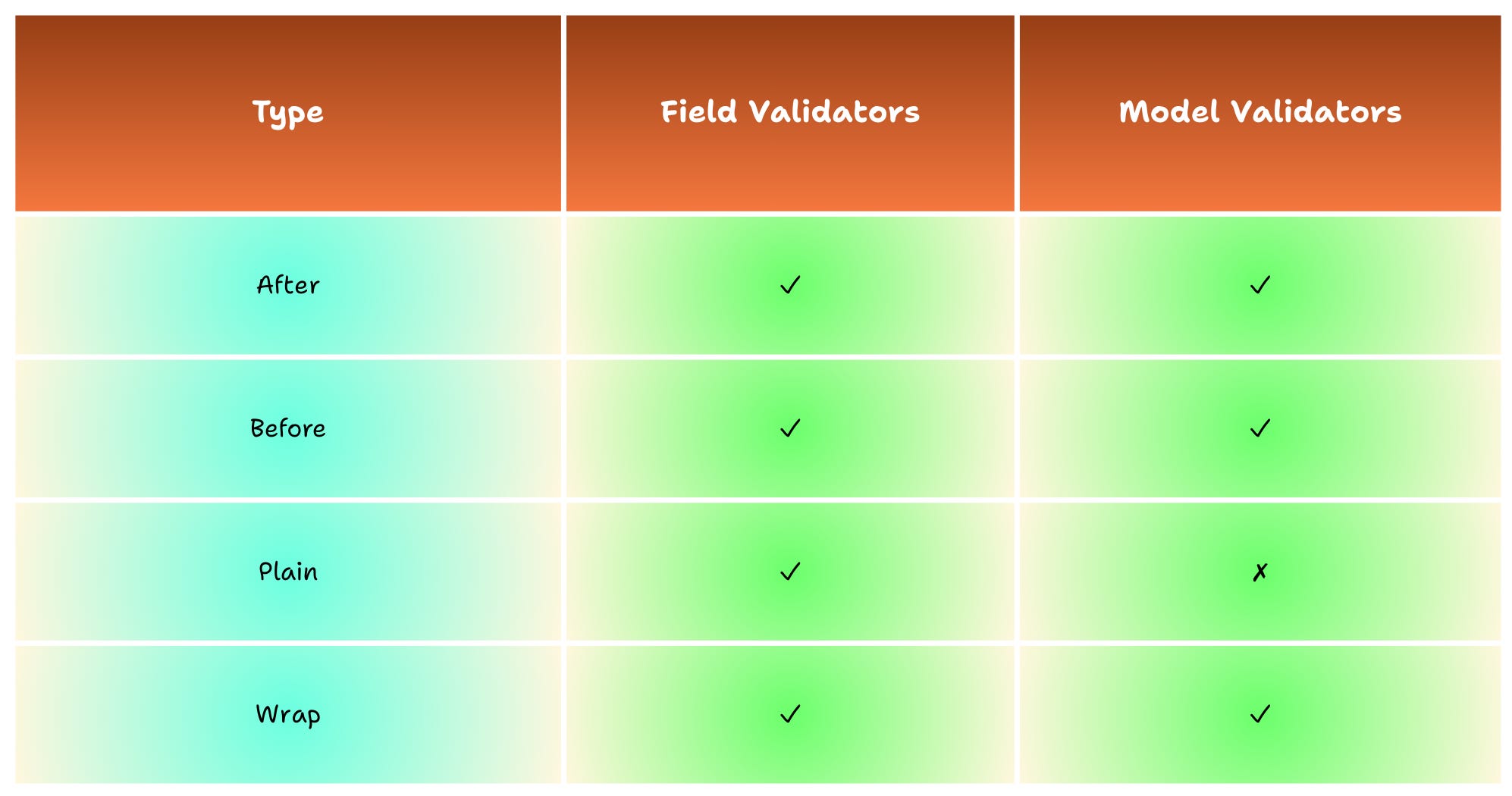
Additionally, Pydantic provides specialized data parsing methods that serve as entry points for different input formats:
model_validate() – Parse dictionaries and objects
model_validate_json() – Parse JSON strings and bytes objects
model_validate_strings() – Parse string dictionaries
These parsing methods handle the data ingestion phase, while the validators above define the custom logic.
Now that we’ve outlined the parsing methods and the three main validator types, let’s narrow in on field and model validators and see how they differ in scope and usage.
Let’s dive in!
Field Validators: Custom Validation Logic
Field validators allow you to implement custom validation logic that goes beyond simple type checking and constraint validation. Pydantic provides several validator modes that give you precise control over when and how validation occurs:
mode='before': Runs before Pydantic's built-in validation and type conversion.
mode='after': Runs after Pydantic's validation (default mode).
mode='plain': Runs instead of Pydantic's validation. You take full control: the field’s value is returned as-is, and Pydantic skips all internal checks and type conversions.
mode='wrap': Wraps Pydantic's validation. You can decide if and when the normal validation runs.
Default Field Validation (After Mode)
Let’s explore a simple example of field validators that demonstrates how Pydantic enforces both built-in constraints and custom validation logic.
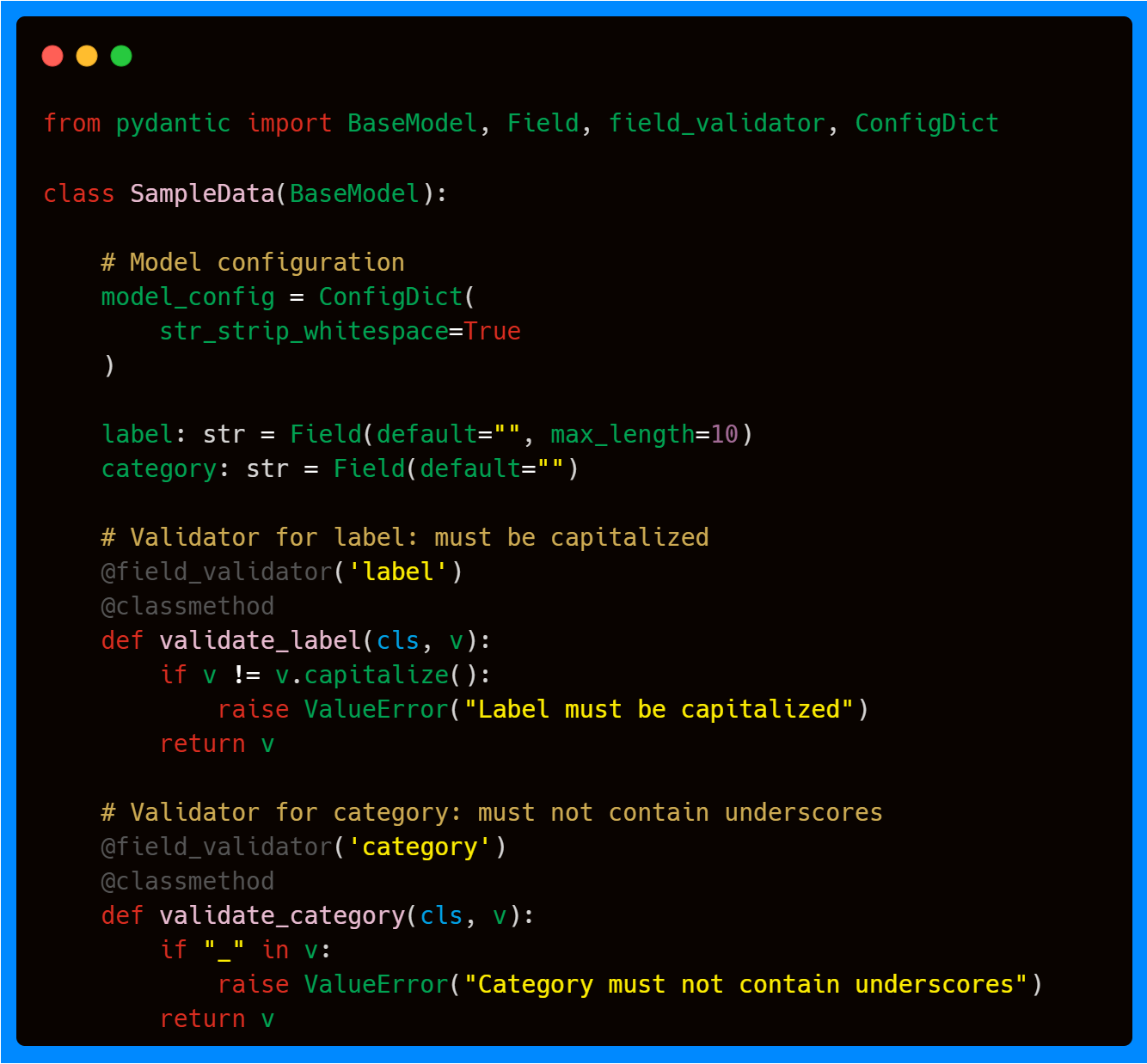
In this example, we are combining Pydantic’s built-in validation features (ConfigDict and Field), shown in the previous article, with field validators. The built-in options run first: ConfigDict automatically strips whitespace from all string fields, which reduces repetitive cleaning logic, while Field(max_length=10) ensures that the label contains a maximum of ten characters. After these internal checks, the custom field validators run to enforce rules that cannot be expressed with Field or ConfigDict alone.
The label field performs an additional validation that requires the string to be capitalized, something that cannot be enforced with built-in constraints. Finally, the category field enforces an additional rule by rejecting strings that contain underscores.
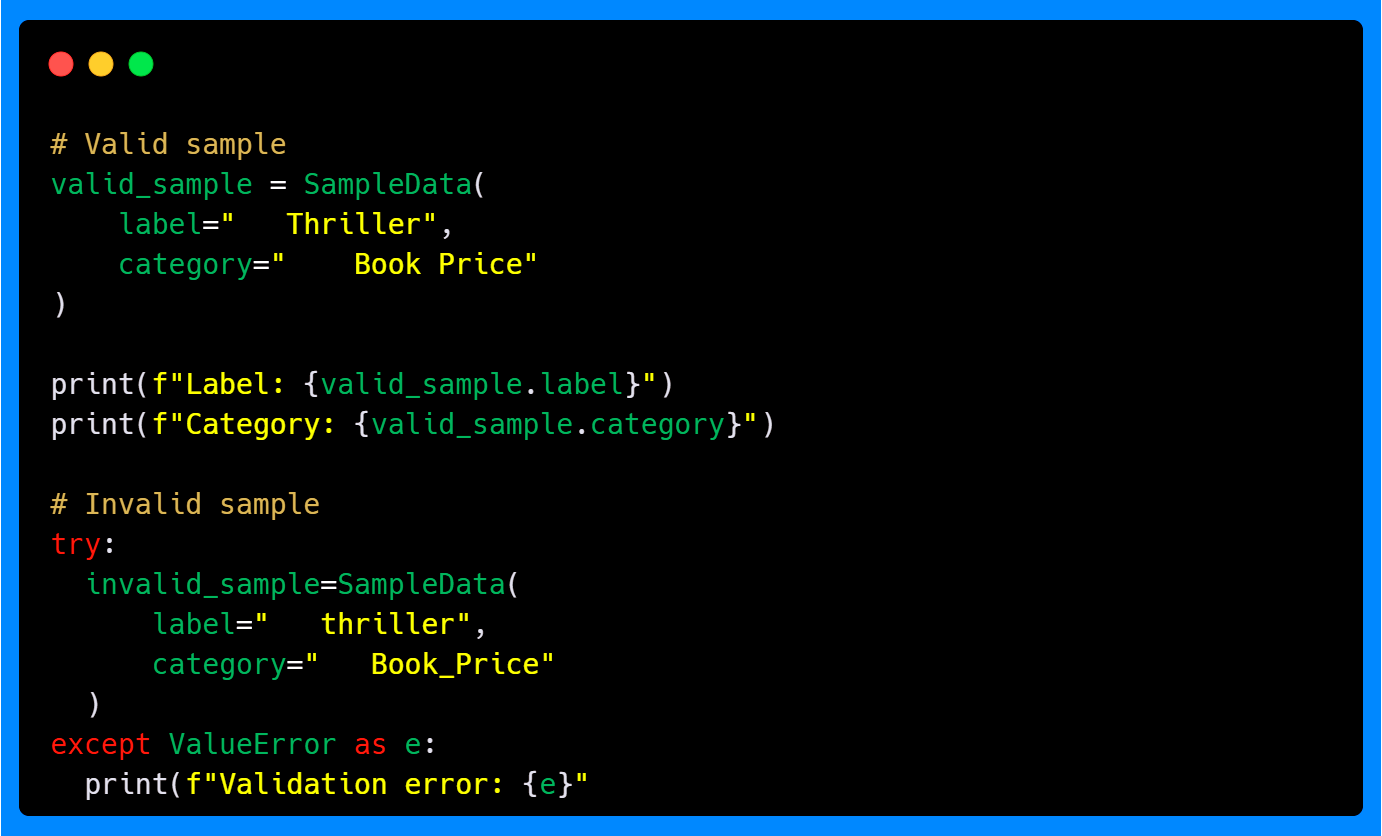
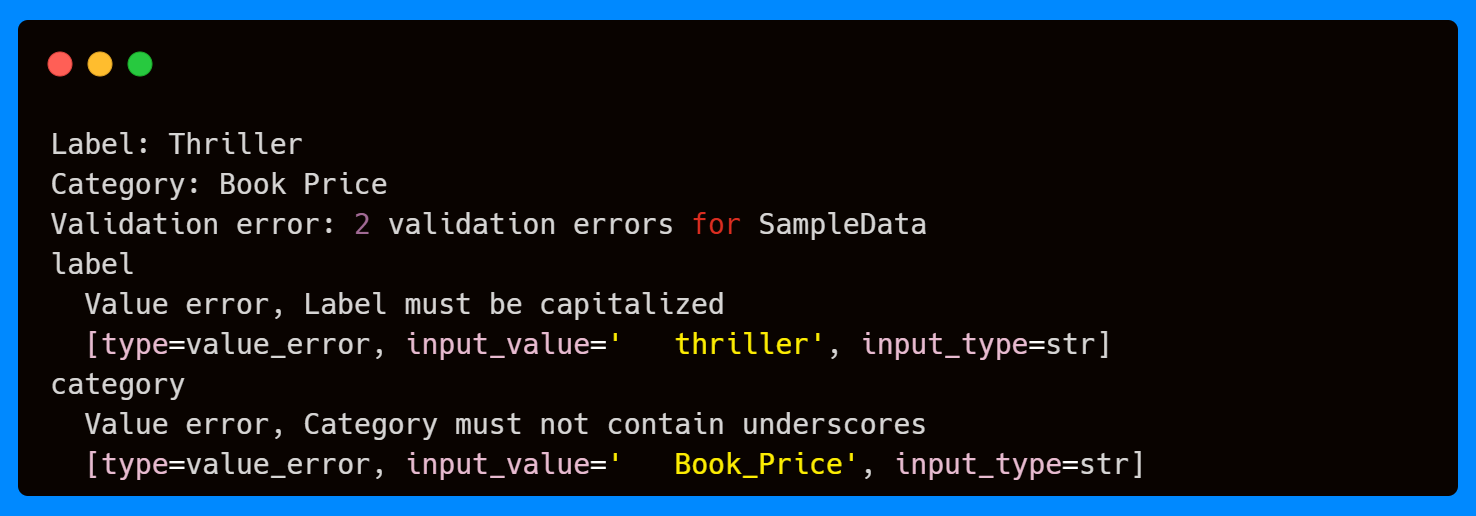
The validators work together to catch different issues: the non-capitalized label and the underscore in the category. This ensures that bad or inconsistent data never makes it into your pipeline.
If you're enjoying this content, consider joining the AI Echoes community. Your support helps this newsletter expand and reach a wider audience.
Field Validator Modes in Action
In the previous section, we saw how field validators can add custom rules on top of Pydantic’s built-in validation. Apart from the after mode, they also support others like before, plain, and wrap, which let you control exactly when and how your custom logic runs. Let’s walk through each of the modes with simple examples.
Before Mode
This mode runs before Pydantic’s built-in validation and type conversion. This is useful for cleaning or transforming raw input before Pydantic processes it.
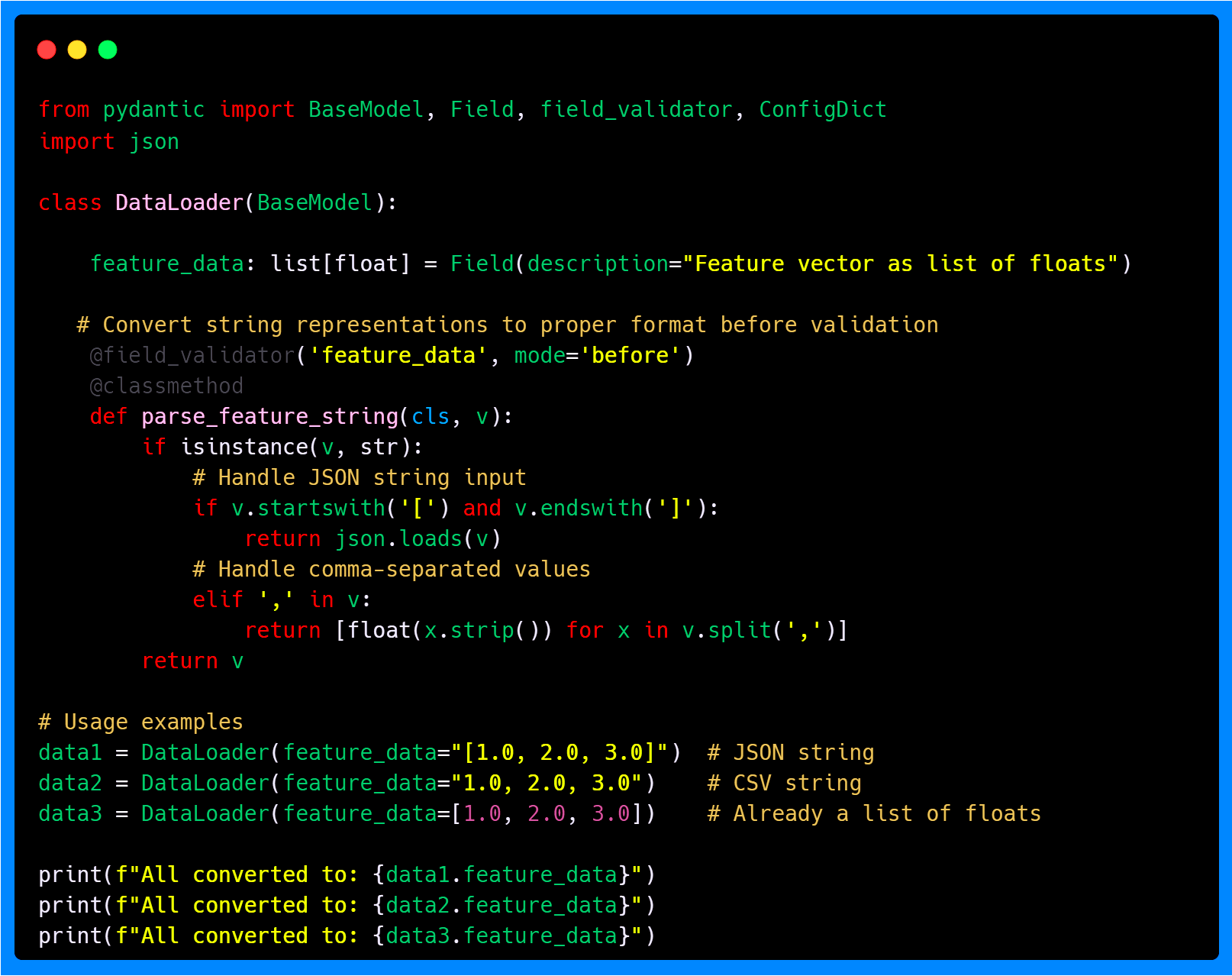
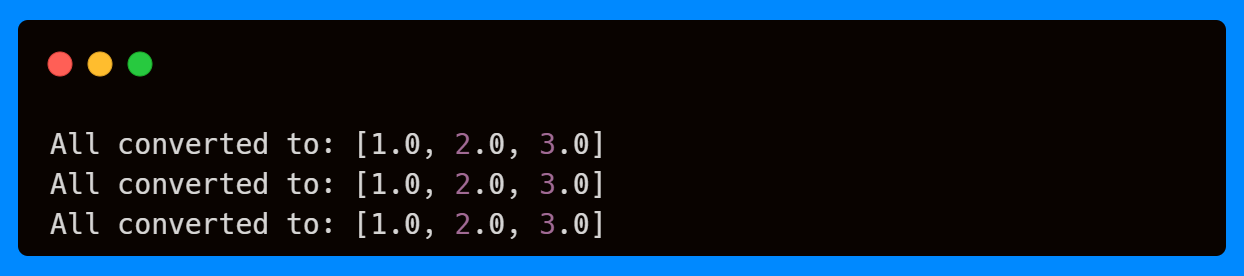
Here we see that the feature_data field is expected to be a list of floats. However, in practice, inputs might arrive in different formats—such as JSON strings, comma-separated values, or already parsed lists. By using a before validator, we can standardize these formats before Pydantic applies its built-in type checks.
The validator inspects the input and, if it’s a string, determines whether it should be parsed as JSON or split as a CSV. If it’s already a list, it simply returns the value unchanged. Once this preprocessing step completes, Pydantic runs its internal validation to confirm that the result is indeed a list of floats, enforcing type safety without requiring the user to always supply perfectly formatted data.
Plain Mode
The plain mode runs instead of Pydantic's validation, which means you handle everything yourself, including type conversion and any other checks. In this mode, Pydantic does not perform any internal validation or type enforcement on the field.
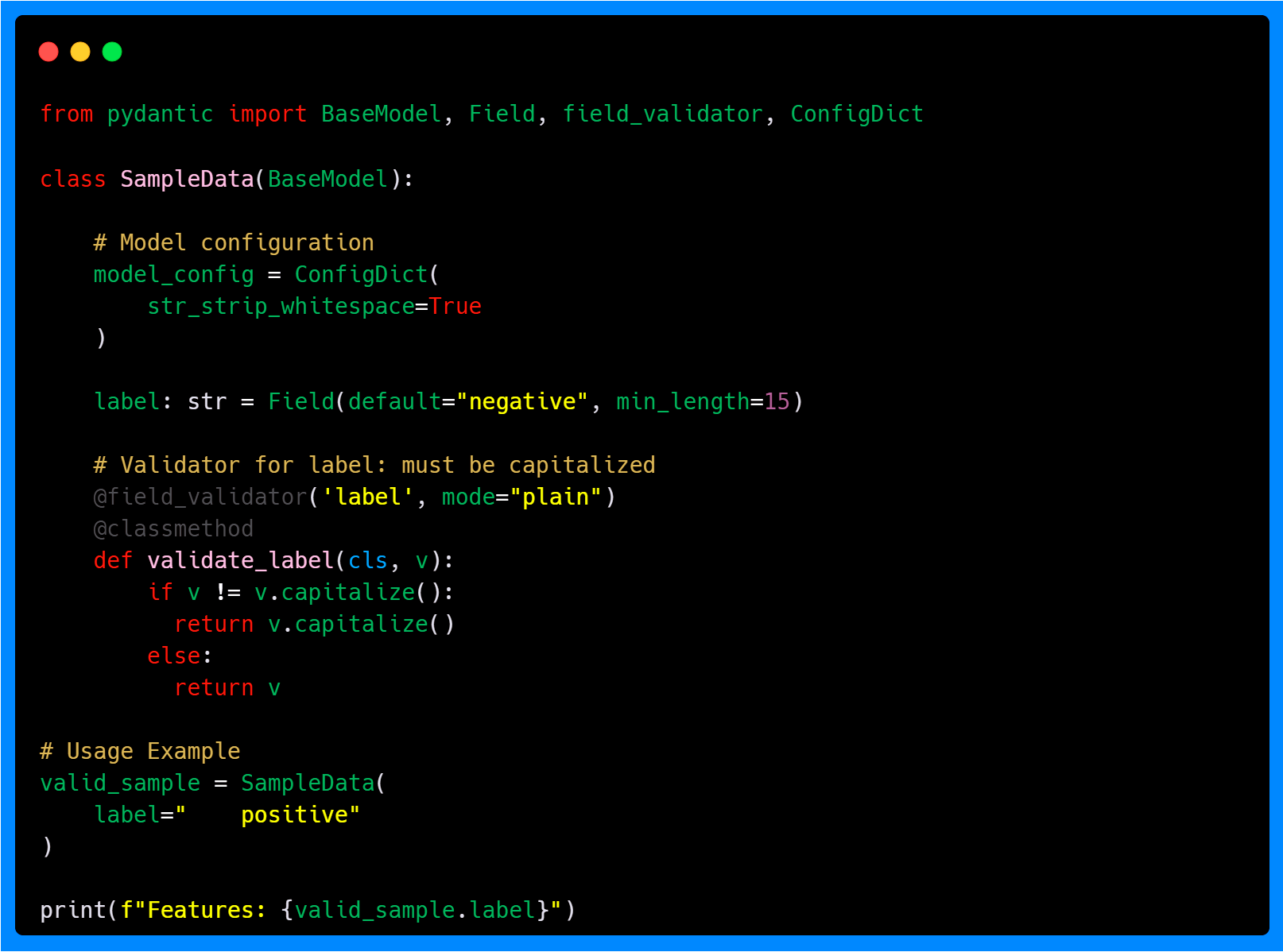

Note that the label field has a minimum length requirement of 15 characters. Also, the ConfigDict enforces whitespace stripping. However, because we are using a plain validator, Pydantic skips its internal checks. The validator ensures that the string is capitalized, but you would need to handle other constraints yourself if required. Plain mode gives you full control over the validation process.
Wrap Mode
The wrap mode allows you to wrap Pydantic's validation, giving you control over when and how the built-in validation runs. This is particularly useful for preprocessing input, handling errors gracefully, or applying additional transformations before or after the standard validation logic.
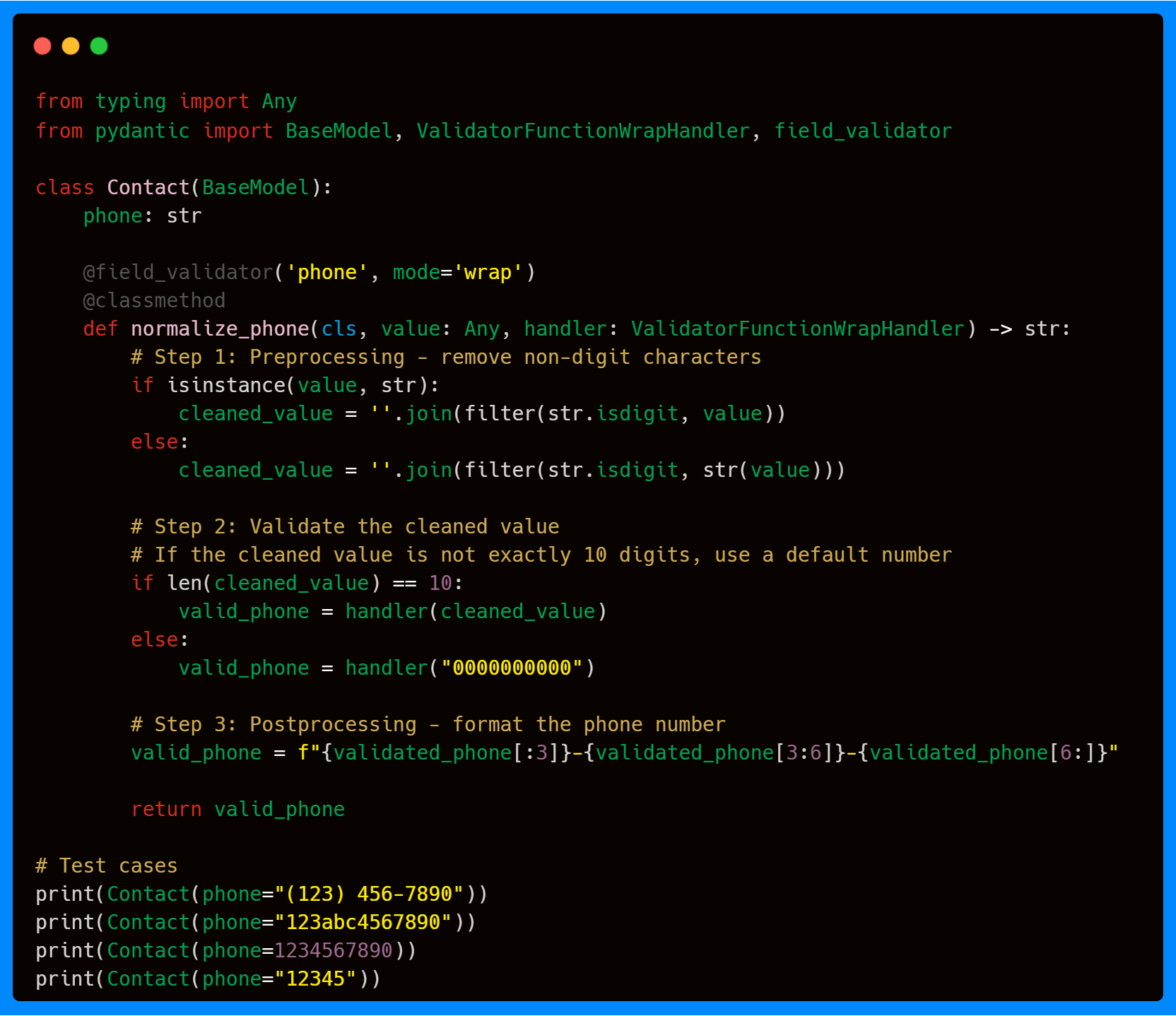
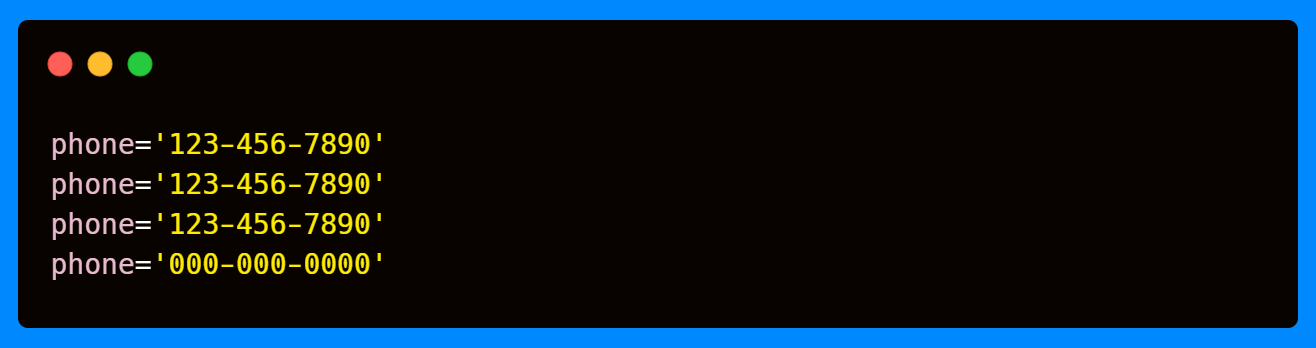
The code above shows that the normalize_phone validator performs three main steps. First, it cleans the input by removing any non-digit characters, ensuring a consistent format regardless of how the phone number is provided. Second, it checks the length of the cleaned number: if the length is correct, it passes the value through Pydantic’s built-in validation using a handler, which is a mandatory callable. If it’s not exactly 10 digits, a default number is returned. Finally, it formats the validated phone number in the standard XXX-XXX-XXXX format.
This demonstrates how wrap mode gives you the flexibility to run custom preprocessing, control validation flow, and apply postprocessing, all while still leveraging Pydantic’s validation system.
When to Use Each Mode?
Pydantic’s validator modes—before, after, plain, and wrap—offer distinct ways to handle data validation, each suited to specific use cases. Choosing the right mode depends on the nature of your input data, the validation requirements, and how much control you need over the process. Below is a concise explanation of when to use each mode.
After Mode (default): Use after validators to perform additional checks or transformations on a field’s value after Pydantic’s standard validation and type coercion have occurred. This mode is useful when you need to validate the final, coerced value against custom rules that Field constraints can’t cover. While Field constraints handle simple bounds or patterns, after validators are better for complex, context-dependent logic that depends on the fully validated field value.
Before Mode: Use before validators when you need to preprocess or transform input data before Pydantic’s standard validation (e.g., type coercion or constraints defined in
Field) occurs. Unlike ConfigDict (which applies model-wide settings likestr_to_lower) or Field constraints (which enforce patterns or ranges), before validators allow custom logic tailored to specific fields, giving you flexibility to handle edge cases without altering the entire model’s behavior.Plain Mode: Use plain validators when you want complete control over a field’s validation, bypassing Pydantic’s built-in type coercion and Field constraints entirely. This mode is suitable for cases where the input must be validated and returned as-is without further processing. Plain validators are fully manual, making them ideal for highly specific or non-standard validation requirements.
Wrap Mode: Use wrap validators when you need to wrap or extend Pydantic’s default validation logic, allowing you to inspect the input, optionally call the default validator, and then modify the result or raise an error. This mode is powerful for scenarios where you want to combine custom preprocessing or postprocessing with Pydantic’s standard validation.
Note: Coercing a value, means it automatically converts compatible inputs into the expected type. For example, a string like "123" can be coerced into an integer 123, or "3.5" into a float 3.5. If conversion isn’t possible, Pydantic raises a ValidationError. In my next article I will cover how Pydantic manages coercion, as there are some in-built automatic coercions.
Additional Parameters
So far, we’ve seen how validator modes (before, after, plain, and wrap) give you precise control over when and how validation happens. But Pydantic’s @field_validator decorator also accepts additional parameters that fine-tune its behavior. These include specifying one or more target fields, checking field existence, and even customizing schema generation. Together, they give you more precise control over validation behavior without complicating the core logic of your model. The table below summarizes these options, and you can extend your models with them as your use cases grow more complex.
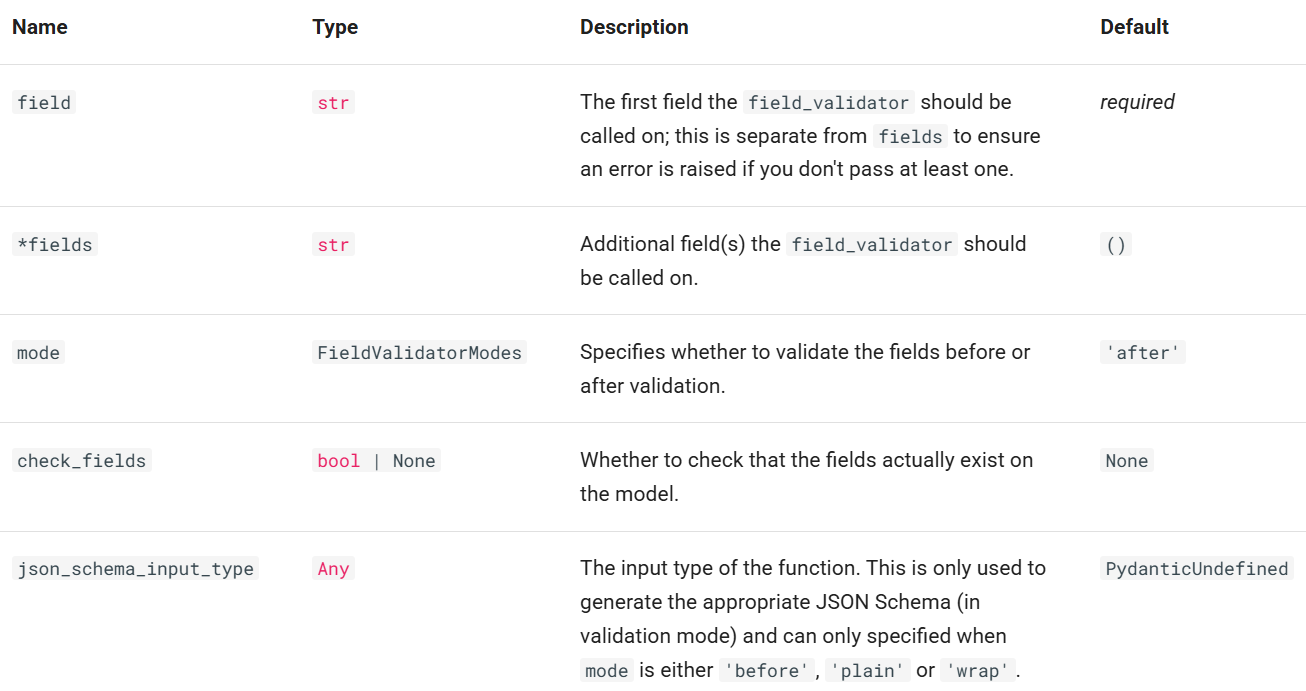
In practice, you’ll usually just pass the required field(s) and optionally a mode, but it’s good to know that parameters like check_fields or json_schema_input_type exist for more advanced scenarios. The important point is that validators are flexible—whether you want them applied to multiple fields, integrated into schema output, or configured with stricter checks, Pydantic gives you the levers to do so.
While field validators are great for single attributes, some validation rules depend on multiple fields working together—this is where model validators step in.
Model Validators: Cross-Field Validation
While field validators let you add rules to individual attributes, model validators give you control over the validation of the entire model. They are particularly useful when rules involve multiple fields or when you need to validate the overall state of the object.
Just like field validators, model validators support different modes that control when they run:
mode='before': Runs before any field validation. The validator receives the raw input data.
mode='after': Runs after all field validation is complete (this is the default).
mode='wrap': Wraps the entire validation process.
Notice that, unlike field validators, model validators do not support plain mode—because they deal with the whole object, they’re always expected to interact with Pydantic’s validation pipeline in some way.
Default Model Validation (After Mode)
The default after mode allows you to run custom checks once all fields have already been validated. This is useful when your validation logic depends on the final state of multiple fields.
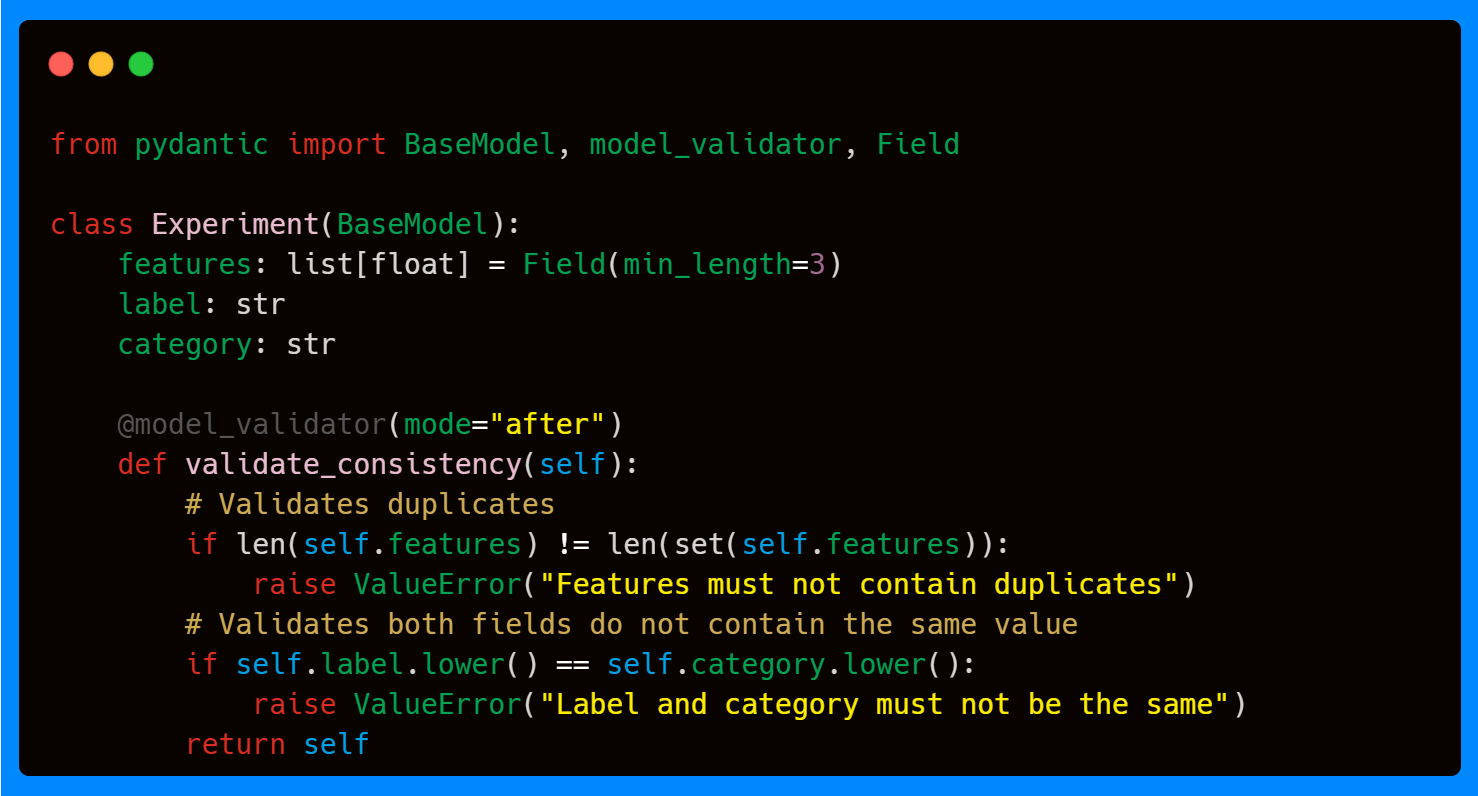
In the above example, the model validator ensures that features have no duplicates, and that label is not the same as category. Both of these checks require awareness of multiple fields, making them a natural fit for a model-level validator.

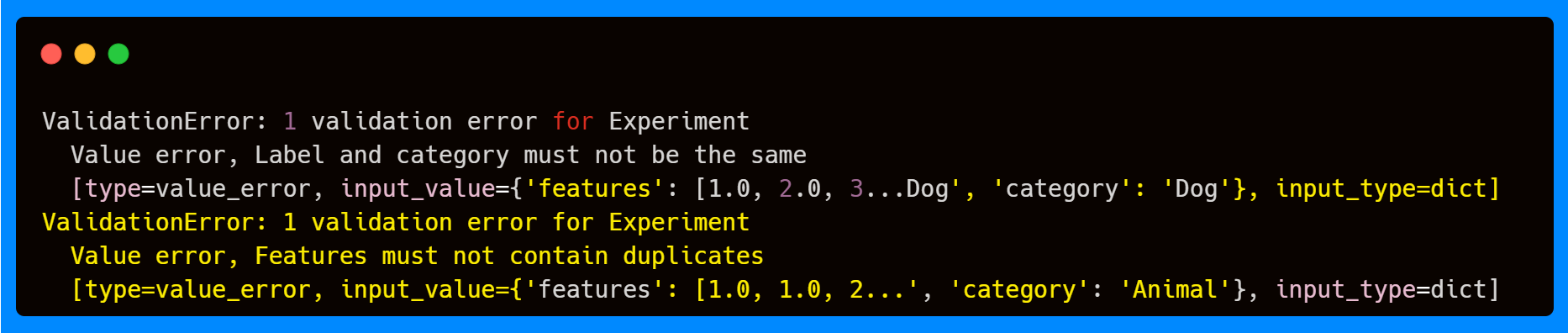
If you try to pass in invalid data (like duplicate features or identical labels and categories), the validator raises an error. Importantly, this happens after field-level validation—so if the features field has fewer than 3 elements, that error will surface first.
Note: Pydantic validation is performed in the order fields are defined, and errors are raised in that order.
Before Mode
Model validators also support a before mode, which runs before field validation or type coercion. Instead of receiving a validated model, it receives the raw input data dictionary exactly as it was passed to the model. This makes it useful for cleaning, reshaping, or normalizing data when you can’t assume it’s already in the correct structure.
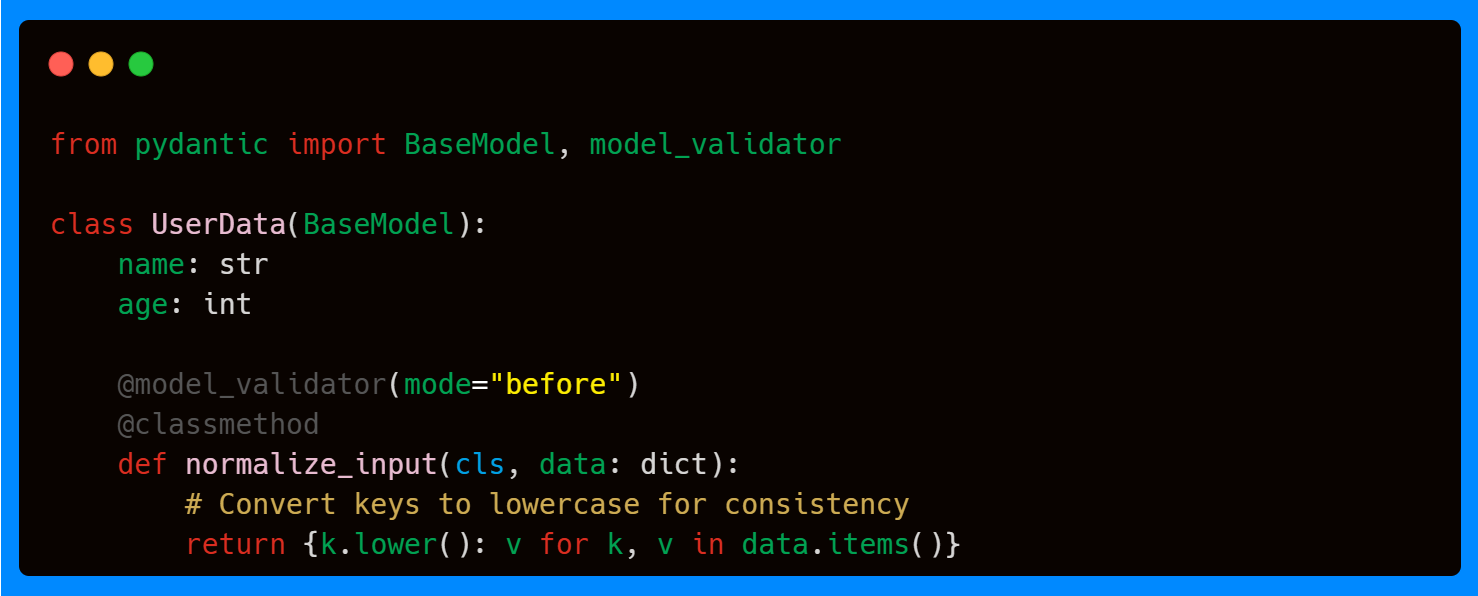
For example, suppose you want your model to accept keys with inconsistent casing ("Name", "NAME", "Age", "AGE", etc.) and normalize them into a standard format. A before model validator can preprocess the dictionary so that downstream field validation works correctly.


This pattern is particularly helpful when handling inconsistent external data sources, such as JSON or user-submitted forms, where naming conventions can vary. We saw a similar example in the first article of this series using Field aliases.
This mirrors the behavior of Field aliases that we saw in the first article of this series, but at the broader level of the entire input dictionary.
Wrap Mode
Finally, wrap mode allows you to take control of the whole model validation lifecycle. Like with the field validator, instead of running strictly before or after, a wrap model validator lets you preprocess the input, decide whether or not to run Pydantic’s built-in validation, and postprocess the resulting validated model.
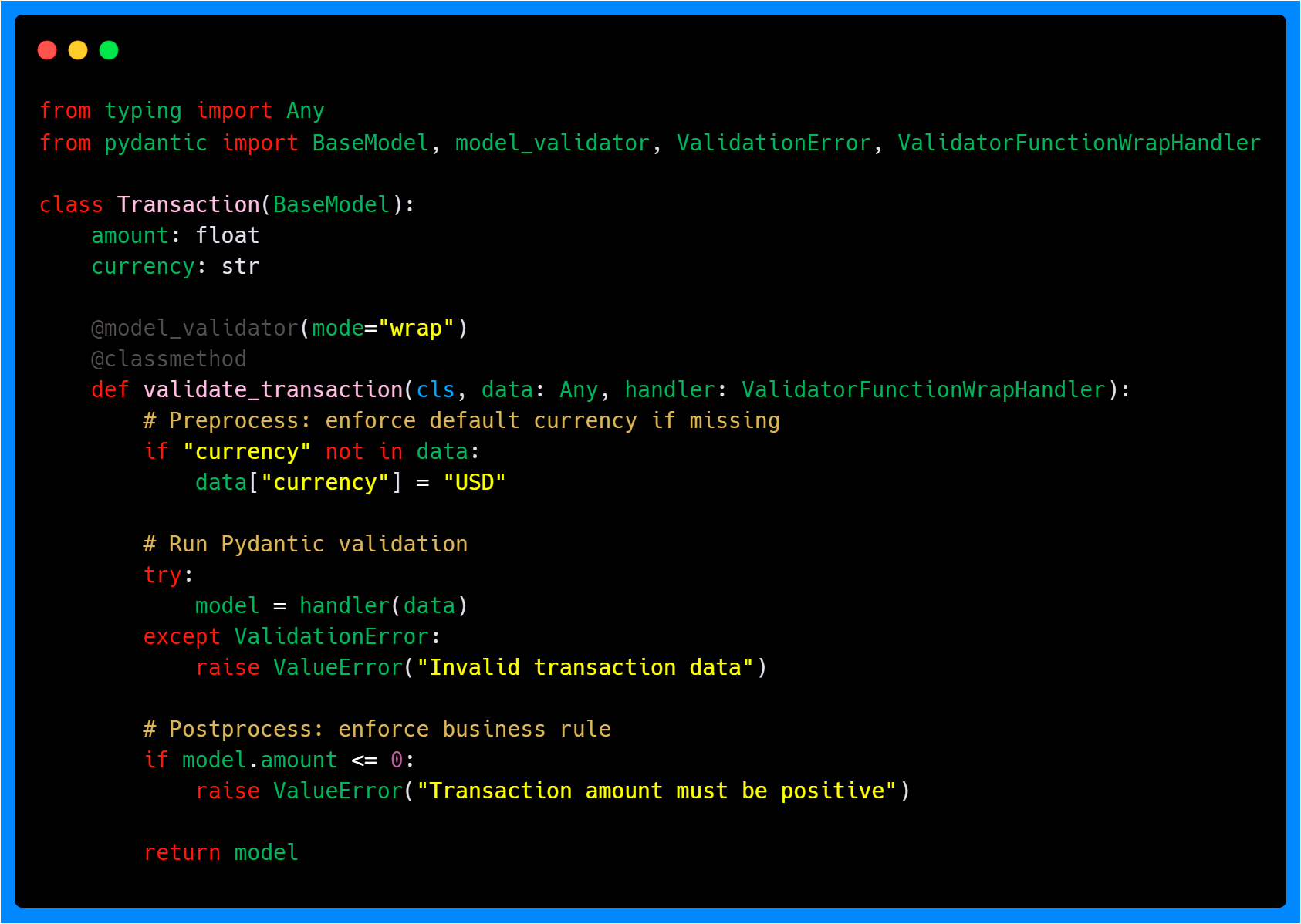
A practical use case is a Transaction object like the above, where a default value should be injected if currency is missing, validation should run normally to check field types, and a final business rule ensures that amount must be positive.
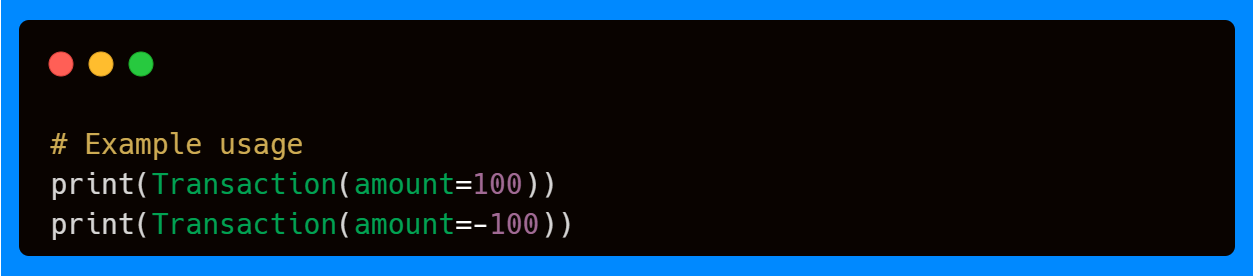

Above, you can see that preprocessing ensures missing fields don’t cause immediate validation errors, built-in Pydantic validation keeps type coercion and constraints in place, and postprocessing enforces higher-level business rules that apply to the model as a whole.
This is conceptually similar to field-level wrap validators, but now it applies to the entire model object.
When to Use Each Mode?
Just like with field validators, the choice of mode for model validators depends on where you want your logic to run in the validation lifecycle. The key difference is scope: instead of focusing on a single field, model validators deal with the entire object, making them the right choice for cross-field consistency checks and whole-model transformations.
After Mode (default): Use after model validators when you want to enforce rules that depend on multiple fields after they’ve already been validated. This is the most common use case for model validators. For example, ensuring that two fields are not equal, checking that a list field has no duplicates, or verifying that a derived value matches its components. Because all fields have already passed type coercion and field-level validation, you can safely assume you’re working with clean, final values.
Before Mode: Use before model validators when you need to normalize or restructure raw input before Pydantic validates individual fields. This is especially helpful when your data comes from external systems where the field names, casing, or formats aren’t guaranteed to match your model. By cleaning or reshaping the dictionary upfront, you ensure that field validators and type coercion can run smoothly without unexpected errors.
Wrap Mode: Use wrap model validators when you need full control of the validation pipeline at the model level. With wrap mode, you can:
Preprocess the raw input dictionary.
Decide whether or not to call Pydantic’s built-in validation (via the
handler).Postprocess the fully validated model before returning it.
This makes wrap mode particularly powerful for advanced workflows, such as injecting default values, applying business rules that span the whole object, or handling complex error recovery.
Additional Parameters
Compared to field validators, model validators keep things simpler—they only accept a single parameter—mode—which determines whether the validator runs before, after, or wraps Pydantic’s built-in validation. Since model validators operate at the level of the entire object, this is usually all you need: their main purpose is enforcing consistency across multiple fields or applying whole-model transformations, rather than configuring individual field-level behavior.
So far, we’ve worked with field- and model-level validation, but Pydantic also provides a way to enforce validation at the function level with @validate_call.
Validation Call
The @validate_call decorator lets you apply Pydantic’s validation directly to function arguments, and optionally return values, without writing a model. It parses and coerces inputs based on type annotations, raising errors when arguments don’t match the expected types.
Here’s a simple example where the decorator enforces input types and performs automatic validation.
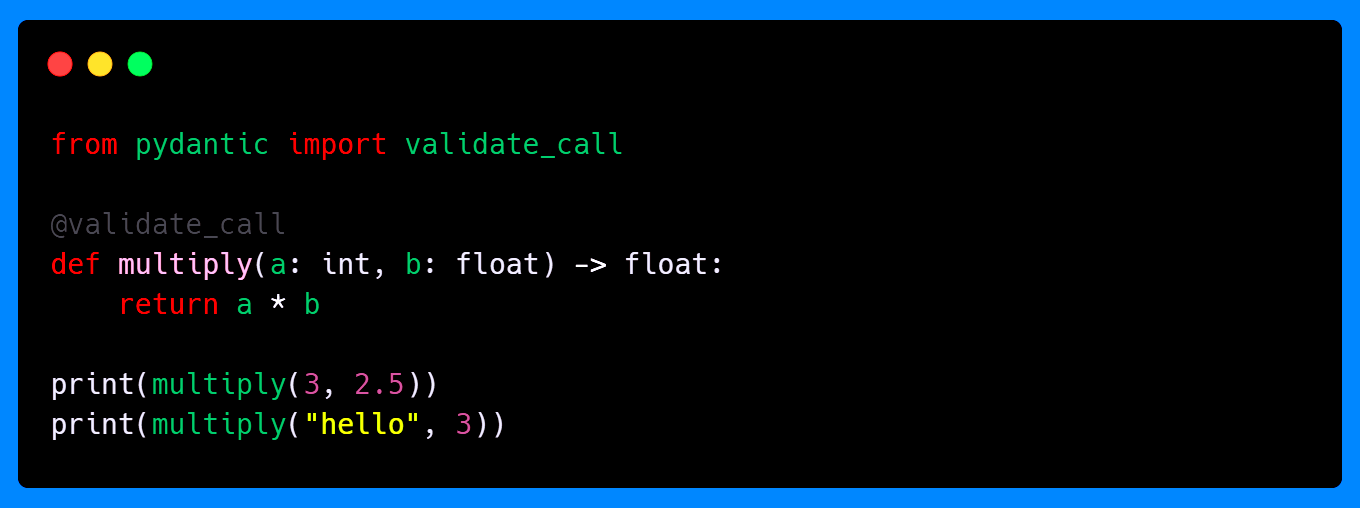
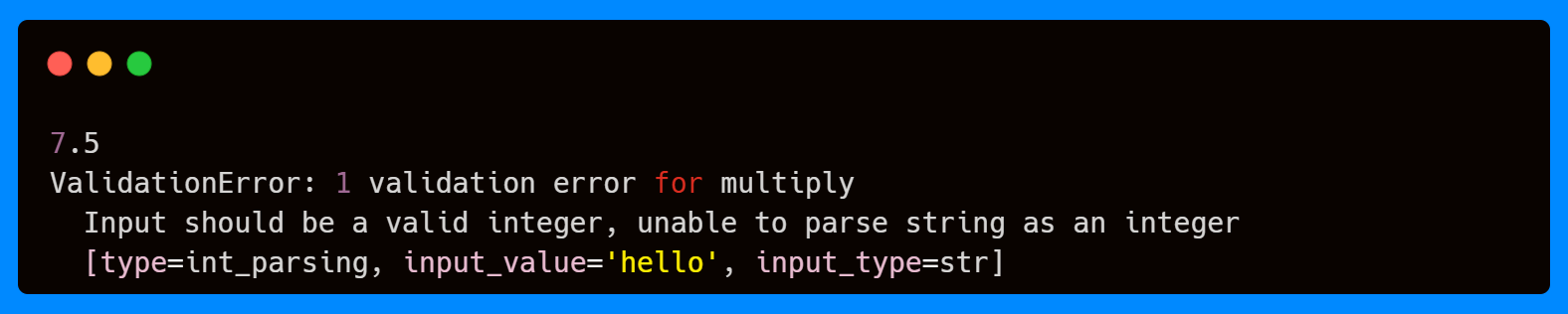
Here, the first call succeeds because both arguments match their annotated types. The second call fails since "hello" cannot be coerced into an integer, and Pydantic will raise a ValidationError before the function is even executed.
You can also use Field or ConfigDict to add constraints or defaults to function parameters, just like you would do with model fields. This allows you to enforce stricter rules while keeping function signatures clean.
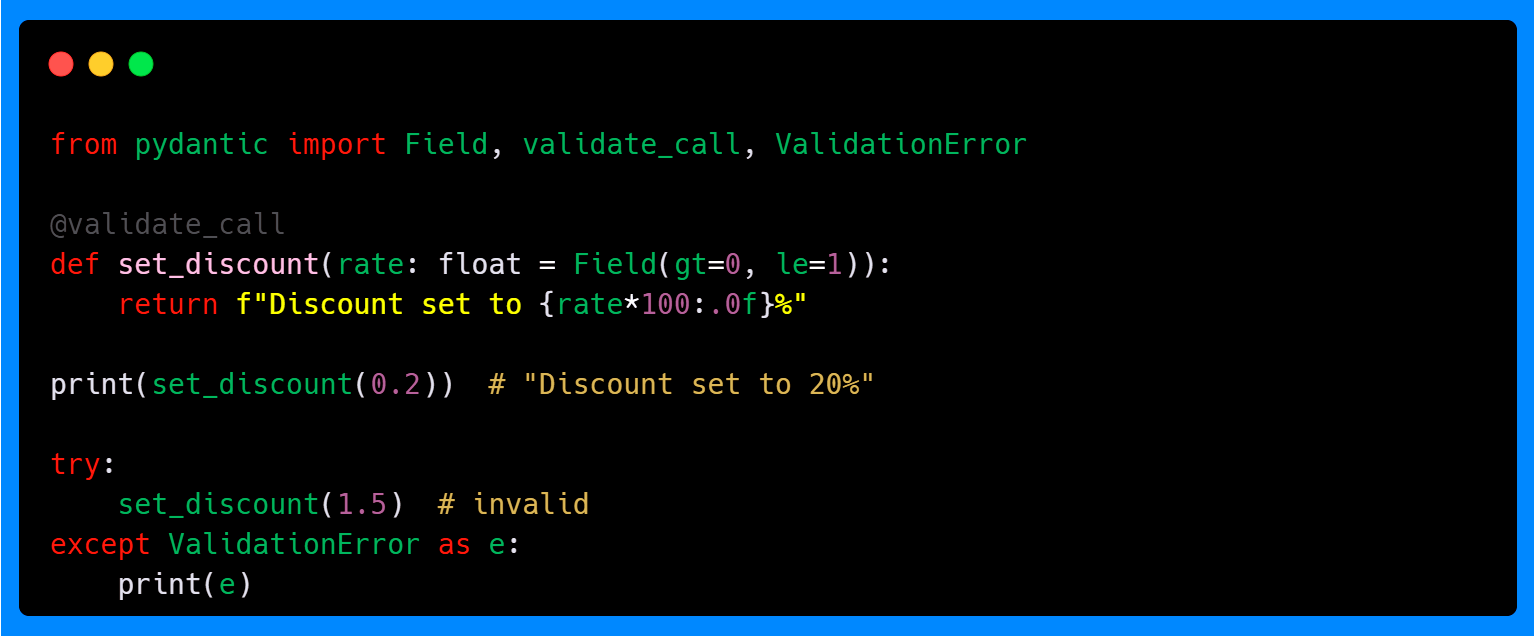
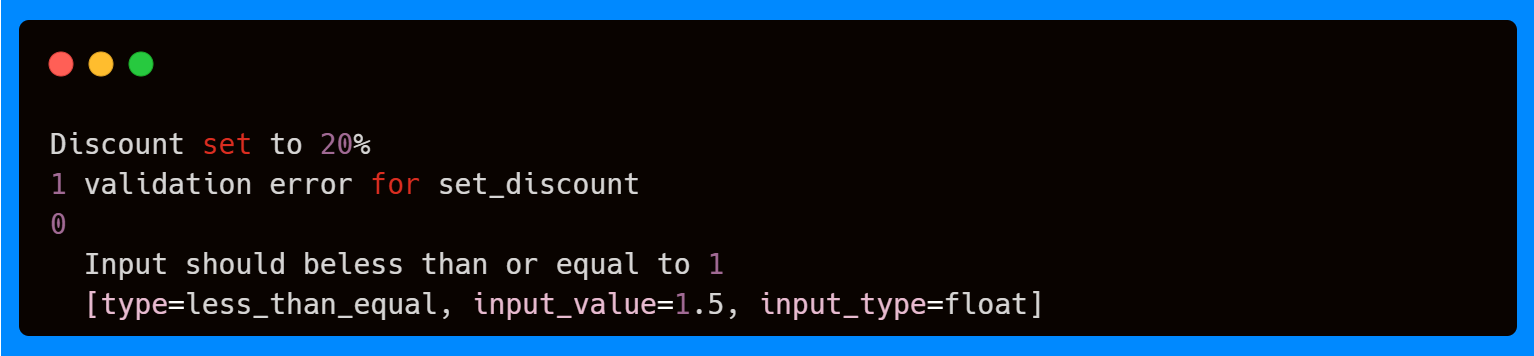
With @validate_call, you get the same consistency and safety as Pydantic models, but applied directly to function calls—perfect when you want strong validation on utility functions or service calls without the overhead of creating a separate model.
Additional Parameters
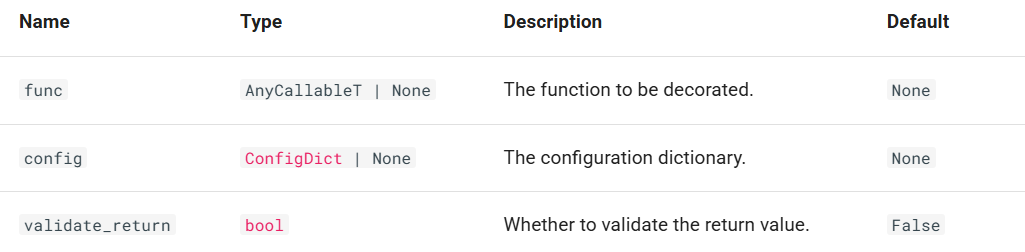
In addition to its core behavior, @validate_call supports a small set of parameters that let you tune how validation is applied. The most important is validate_return, which determines whether Pydantic should also validate the function’s return value. You can also supply a ConfigDict via config to adjust validation settings mirroring how you would configure a model. Finally, the func parameter lets you decorate a function programmatically.
However, @validate_call is powerful but not without limitations—for example, it doesn’t work on built-in functions and does not support all types of callables. You can find the full details in the usage errors.
Data Parsing Methods: Entry Points for Specific Formats
Now that you understand how to create custom validation logic with field and model validators, let's explore specialized methods for handling external data in different formats. While you can always create models directly with the syntax User(name="Alice", age=30), Pydantic provides three additional methods optimized for common data formats you'll encounter when integrating with external systems.
Think of these methods as specialized tools for specific data sources—each designed to handle the format conversions before your validation pipeline runs.
For Dictionaries and Objects
The method model_validate() allows to parse and validate Python dictionaries or other model instances. Common sources can be database query results converted to dicts, or config files already parsed.
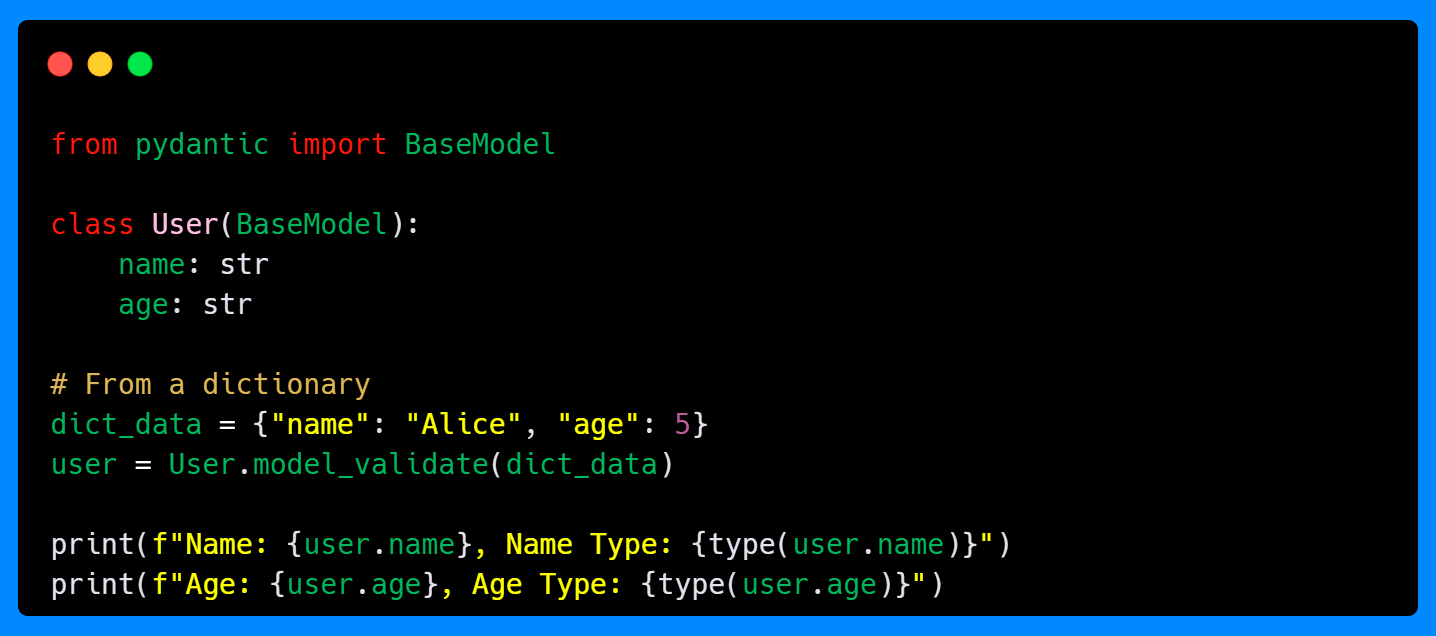
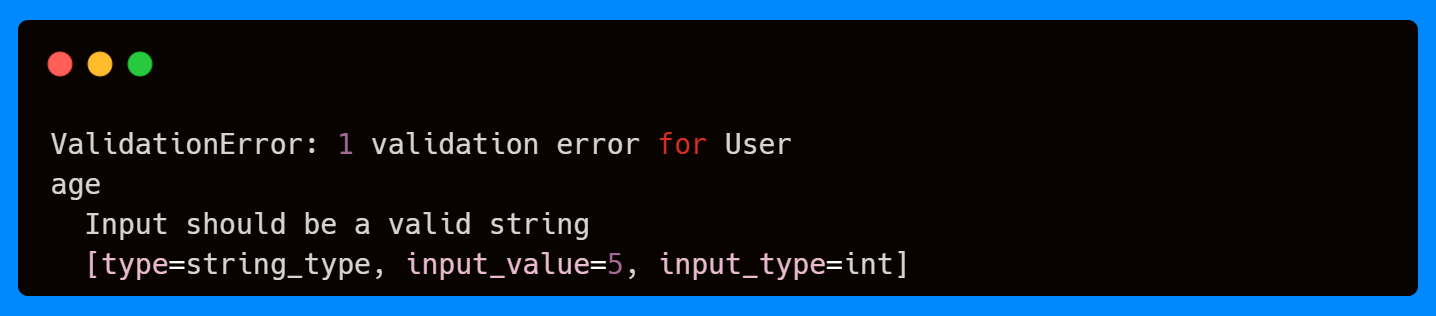
Here, the dictionary is passed into model_validate(). As the field age requires a string, but the value to parse is an integer, Pydantic raises a validation error, as it works in the same way as the field and model validation decorators.
For JSON Strings and Byte Objects
When working with APIs or stored configuration files, JSON is one of the most common data formats. Pydantic provides model_validate_json() to handle JSON strings or bytes directly, saving you the extra step of calling json.loads() yourself.
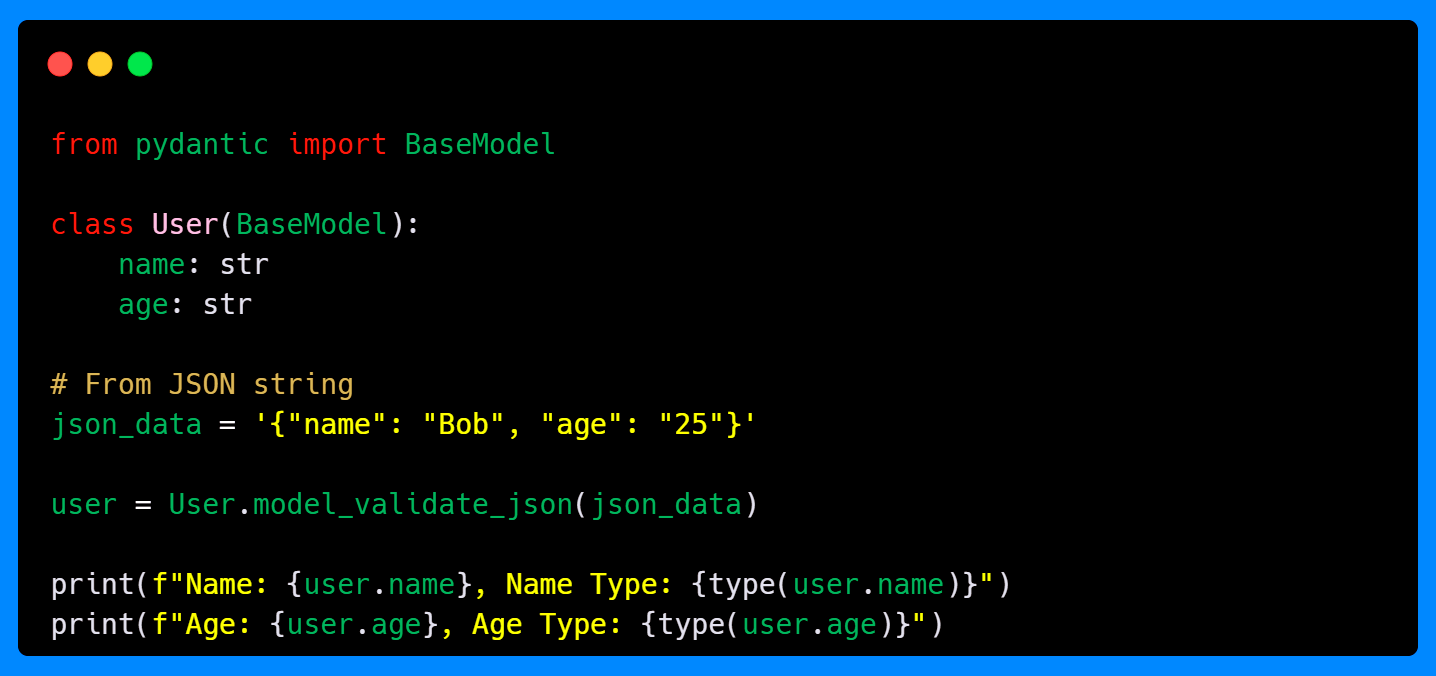

In this example, the JSON string is passed directly into model_validate_json(). Pydantic internally parses the JSON into a dictionary and then runs validation, ensuring that all fields match the declared types.
For String Dictionaries
Sometimes, you’ll receive data where everything is stored as strings (keys and values)—common in form submissions, query parameters, or CSV exports. Instead of manually converting each value to the right type, you can use model_validate_strings().
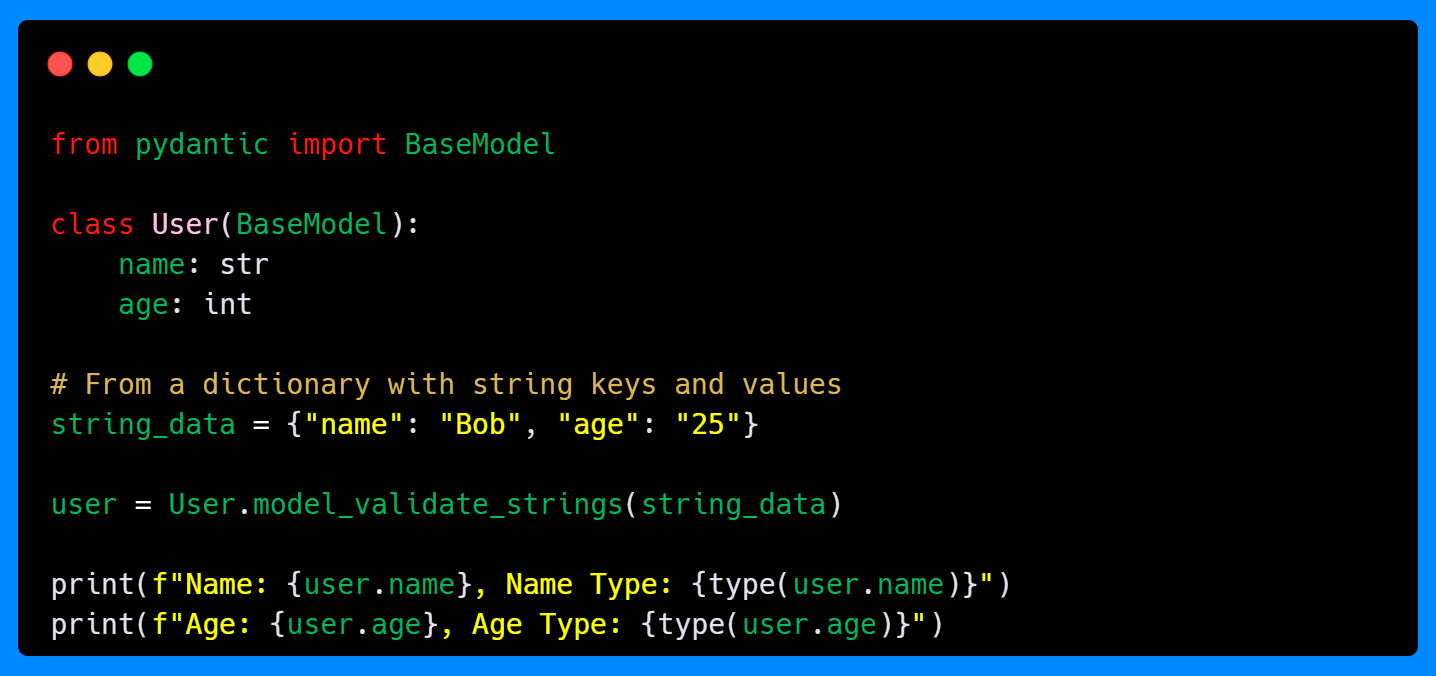

Here, even though the "age" value is a string in the input dictionary, Pydantic automatically coerces it into an integer. This method is especially useful when working with external systems that deliver all values as strings, making it easy to enforce type safety.
Key Takeaways
In this second part of our Pydantic series, you’ve learned how Pydantic’s advanced validation system extends far beyond simple type checking:
Field validators let you enforce custom rules on individual attributes, with modes like
before,after,plain, andwrapgiving you fine-grained control over when and how validation runs.Model validators enable cross-field checks and transformations at the object level, making them ideal for consistency rules that span multiple attributes.
Validation call applies Pydantic’s validation guarantees to function arguments, bringing the same reliability to service calls and utility functions without requiring full models.
Data parsing methods provide specialized entry points for dictionaries, JSON strings, and string-only payloads, ensuring that external data is properly converted and validated.
Together, these tools provide you with the flexibility to handle everything from light preprocessing to fully customized pipelines. They make your models resilient against messy or inconsistent input while keeping the codebase clean and maintainable. With practice, you can combine validator modes strategically—using before to normalize raw inputs, after to enforce rules on finalized values, and wrap for end-to-end control of the validation flow.
In the next and last part of this series, we’ll explore how Pydantic handles multiple data formats with unions, serialization, and different types such as custom, extra, and network. We’ll also dive deeper into how Pydantic automatically converts compatible input types behind the scenes with coercion, reducing boilerplate while still catching invalid values.
I don’t write just for myself—every post is meant to give you tools, ideas, and insights you can use right away.
🤝 Got feedback or topics you'd like me to cover? I'd love to hear from you. Your input shapes what comes next!